Posts

Picture of the MSD Atomic EFI Module

Atomic EFI

We’ve blogged before about how to power many different EFI systems with Infinitybox.  Examples include the Ford Coyote ECU, the GM LS ECU, the Holley Dominator, the FAST EZ-EFI and many others.  This post is going to cover how to wire the Atomic EFI system from MSD.

Here’s what MSD says about their Atomic EFI:

“The Atomic EFI provides the performance and driveability benefits that you expect from fuel injection. Quick starts, smooth idle and great throttle response just to name a few. Combine the fact that the Atomic will support ignition timing through the ECU and you have a win-win combination. Initial timing is handled through a compact handheld monitor where you simply answer a few car guy questions about your engine and you’re off and running!”

Just like any other EFI system, wiring it with our Infinitybox 10 or 20-Circuit Harness Kit is very easy.  You get several advantages over wiring with a traditional wiring harness.

  • You run less wire in the car.  The ECU sits behind the dash and connects to the MASTERCELL.  The cooling fan and fuel pump are wired to their local POWERCELLs.  You’re not running wires from the ECU all over the car.
  • You can eliminate the need for relays and external fuse holders.  The POWERCELLs are your relays.  Each output is fused inside the POWERCELL.
  • You get security and immobilizer functions in your Infinitybox system.  You don’t have to add a separate alarm system to keep unwanted people from starting your car.
  • You can get cooling fan timing and delays right in the Infinitybox system.  You don’t need to add separate controller modules.

Before you connect your Infinitybox system to your Atomic EFI system, you must completely understand the instructions from MSD.  Click on this link to get to the manual for their Atomic EFI PN 2910 – Throttle Body Kit.  This post is going to show you how to wire the key-on power to the Power Controller.  It will also show you how to wire ground, constant battery power, the fuel pump trigger and the cooling fan trigger.  See the MSD manual for the rest of the electrical connections to their harness.

This diagram will show you the details of wiring your MSD Atomic EFI system to your Infinitybox system.

Picture of wiring diagram showing how to wire the MSD Atomic EFI Power Module with the Infinitybox 20-Circuit Kit

Picture of wiring diagram showing how to wire the MSD Atomic EFI Power Module with the Infinitybox 20-Circuit Kit

To start, you need to connect constant power and ground to the MSD Power Module harness.  MSD recommends connecting the large red wire directly to the battery.  The ground wire should get connected to the chassis through a metal-to-metal connection.

The small red wire is the key-on power wire to the Power Module.  When you key is in the on or start position, you should have battery voltage on this wire.  The small red wire in the MSD harness is going to connect to the ignition output wire on your POWERCELL.  Check the configuration sheet that came with your kit for the correct color and connector orientation for all of the POWERCELL connections.

There are two wires in the MSD Power Module harness for cooling fan triggers.  The pink wire is the primary and the tan wire is for the secondary cooling fan.  Both of these wires are intended to ground a relay coil to turn on the fan.  You can connect them directly to the MASTERCELL inputs.  The MASTERCELL inputs are expecting a ground trigger to turn on the inputs.  You must put a diode in-line between the Power Module fan trigger wires and the MASTERCELL input wires.  This should be a 1N4001 diode.  The orientation of this diode is critical for this to work properly.  See the diagram above for correct orientation of the diode.

Once you have the MASTERCELL input wired to the Power Module for the cooling fan trigger, you need to connect the POWERCELL output to your cooling fan.  See the configuration sheet that came with your kit for the proper wire color.  If you want to use a secondary cooling fan, you can use any of the OPEN outputs on your system.

There is a large orange wire on the Power Module harness for the fuel pump.  This wire puts out a positive signal for the fuel pump.  You will need to invert this signal to a ground signal to work properly with the MASTERCELL.  You can use a relay to do this.  This link will show you how.  The easier way to do this is to use one of our inVERT Mini‘s.

Once you have the MASTERCELL input for the fuel pump properly connected to the MSD Power Module fuel pump output, you need to wire your POWERCELL output to your fuel pump.  Again, your configuration sheet will shows which wire to use.

That’s it.  All of your relays and fuses are built into the Infinitybox system.  Once you follow these steps, you’re ready to power up your system and start tuning the engine.

You can download a PDF copy of this wiring diagram by clicking this link.

Contact our technical support team with any questions related to wiring the MSD Atomic EFI system with your Infinitybox system.

Fuel Pump Trigger

Let’s talk about fuel pump triggers.  In a previous post, we talked about wiring the fuel pump to the POWERCELL output.  In this post, we’re going to talk about how to connect the MASTERCELL input to the fuel pump trigger. We’re getting towards the end of our customer’s install of our 20-Circuit Kit into their 1967 Mustang.  In previous posts, we’ve shown how to mount the MASTERCELL, POWERCELL and primary fuses.  We’ve shown how to run the primary power cables and the CAN cable that connects the cells together.  We’ve gone step-by-step through the process of connecting the POWERCELL outputs to the lights, fans, ECU, starter solenoid, fuel pump and other switched loads.  We’ve shown how to connect your MASTERCELL inputs to the different switches in the car.

It’s time to wire the fuel pump trigger.   Remember how the Infinitybox system works, your loads (lights, fans, pumps, ECU, starter solenoid and other switched functions) get their switched power from the POWERCELLs.  You place the POWERCELLs locally in the car where  you need them.  You connect your switches to the MASTERCELL, which is usually under the dash.  The MASTERCELL connects to the POWERCELLs through a thin data cable.  When you turn on a switch, the MASTERCELL sends a command to one of the POWERCELLs to turn on an output.

In the case of the fuel pump, there is a dedicated output on the rear POWERCELL.  In the case of this 1967 Mustang Kit, this is the tan wire on the POWERCELL A output harness.  That is output 10.  The input wire to the MASTERCELL is number 19.  This is the tan wire with the yellow tracer wire on the MASTERCELL B input harness.  Check your configuration sheet for the specifics on the POWERCELL output wire and the MASTERCELL input wire.

When you ground the MASTERCELL input wire for the fuel pump, the MASTERCELL sends a command to the rear POWERCELL to turn on 12-volts on output 10.  This provides the switched battery power to the fuel pump.  When you disconnect the MASTERCELL input wire from ground, the POWERCELL turns off the output for the fuel pump.

Our customers have many different ways that they want to control their fuel pump.  The easiest is to trigger it with the ignition switch.  To do this, simply connect the fuel pump input wire to the ignition terminal on the key switch.  This wire is would be wired to the same terminal as the MASTERCELL input for ignition.  When the key is in the run position, the inputs for both the ignition and fuel pump would be connected to ground.  The MASTERCELL would tell the front POWERCELL to turn on the ignition output and tell the rear POWERCELL to turn on the fuel pump output.

Another way to do this is to have a separate switch for the fuel pump.  Most race cars have this.  A lot of guys will wire their cars this way because it is easier to work on the car plus it gets you an extra level of security.  Unless you know to flip the fuel pump switch, the car won’t start.  You’d wire a separate fuel pump switch no differently than any other switch to the MASTERCELL.  The MASTERCELL input wire would connect to a normally open terminal on the switch.  The other side of the switch would connect to ground.  Turning on the switch connects the MASTERCELL input to ground, which turns on the fuel pump output on the rear POWERCELL.

Another option for controlling your fuel pump is to connect the MASTERCELL input to your ECU.  Most engine management and EFI systems have an output that triggers the fuel pump.  You can connect this wire from the EFI system to the MASTERCELL to have the ECU tell the Infinitybox system when the pump should be on or off.

There is an important warning that you must watch here.  Remember that the MASTERCELL inputs are designed to be connected to ground.  Applying battery voltage to the inputs may damage them and void the warranty.  Carefully read the manual that came with your EFI system to understand how their fuel pump trigger is set up.  They will usually be identified as either a positive or negative trigger.

If the fuel pump trigger is negative, you can connect that to the MASTERCELL input wire.  We strongly recommend soldering a 1N4001 diode in between the MASTERCELL input wire and the EFI system trigger wire for the fuel pump.  This isolates the MASTERCELL from the EFI system.  Diodes are directional parts so you must wire them with the cathode side facing towards the ECU.  That is the side of the diode that has the stripe on it.  This picture shows an example of the FAST EZ-EFI system and how to wire the diode into the fuel pump trigger.

Picture of wiring diagram showing how to wire the FAST EZ-EFI fuel injection system with the Infinitybox system.

Picture of wiring diagram showing how to wire the FAST EZ-EFI fuel injection system with the Infinitybox system.

If your EFI system has a positive trigger for the fuel pump, you must convert this positive signal to a negative signal.  The easiest way to do this is to use one of our inVERT Mini’s.  This is a small converter that is loomed in the harness.  It so small, you hardly notice that it is there.  This link will take you to more information on the inVERT Mini.  Another option to flip the fuel pump trigger to a ground trigger is to use a relay.  This link will take you to a diagram showing how to use a typical automotive relay to flip a positive trigger to a negative trigger.

In the case of our customer’s 1967 Mustang, they are using the Ford Coyote crate engine.  That has a positive fuel pump trigger.  They chose to use an inVERT Mini to flip the positive signal from the ECU to a ground trigger to the MASTERCELL.  This picture shows the wiring diagram for the Coyote ECU and how the inVERT Mini is wired into the harness.

Image of wiring diagram showing how to wire the Ford Coyote ECU with the Infinitybox 20-Circuit Kit

Image of wiring diagram showing how to wire the Ford Coyote ECU with the Infinitybox 20-Circuit Kit

You can download a PDF of this Coyote wiring diagram by clicking this link.

Click on this link to contact our team with any questions about wiring your car with our Infinitybox system.  

Holley Terminator EFI

Our Infinitybox system can power any ignition and fuel injection system out there.  We recently received a request for a wiring diagram for the Holley Terminator EFI system.  We’ve blogged before about the Dominator and given detailed instructions on how to wire that system with our 20-Circuit Kit.  You can see that here.  This post will cover how to connect to the Holley Terminator EFI system with our 20-Circuit Kit  or our new IPM1 Kit.

Holley ECU

Holley ECU

Holley Terminator EFI System

This link will take you to more information on the Holley Terminator EFI system.  

Our Infinitybox 20-Circuit Kit is going to provide the ignition power to the Holley ECU.  It is also going to take the fuel pump trigger signal from their ECU and the cooling fan trigger.  These two triggers will go to the MASTERCELL which will send signals to the POWERCELL in the front of the car for the cooling fan and the POWERCELL in rear of the car for the fuel pump.  This eliminates the need to add external relays because they are switched from inside the POWERCELLs.  This also eliminates the need to run high-current wiring from the Holley Terminator EFI system to the front and back of the car.  Those signals are sent through our CAN cable.

Before we go any farther, it is very important that you completely read and fully understand the manual that came with your Holley Terminator EFI system.  There are many different parts of properly installing this system, the wiring is just one step.

Once you have read and understand their manual, you must make all of the constant power and ground connections necessary for their system to work.  There are multiple constant power feeds that must be wired directly to the battery and multiple ground connections.  You must also wire in all of the other connections including the coil, tach, O2 sensors, etc.  Their manual will cover these details.

As an overview, here are the points where your 20-Circuit Kit will connect to the Holley Terminator EFI system.

  1. The ignition output on your POWERCELL will supply the key-on power to their system.
  2. Their system will trigger the fuel pump output on your rear POWERCELL from the MASTERCELL.
  3. Their system will trigger the cooling fan output on your front POWERCELL from the MASTERCELL.

This picture shows you the overview of the connections between your Infinitybox 20-Circuit Kit and the Holley Terminator EFI system.

Picture of Infinitybox wiring diagram showing how to wire the Holley Terminator with the 20-Circuit Kit.

Picture of Infinitybox wiring diagram showing how to wire the Holley Terminator with the 20-Circuit Kit.

You can download a PDF of this wiring diagram by clicking this link.

Let’s start with the key-on ignition power.  Check your configuration sheet and find the ignition output wire.  In most cases, this is the light-green wire on the front POWERCELL.  System configurations may vary so check the configuration sheet that came with your kit.  The POWERCELL ignition output wire is going to connect to the red wire with the white stripe in the Holley ECU harness.

Next, you need to connect the fuel pump trigger.  In the ECU harness, there is a green fuel pump wire.  This wire supplies 12-volts to drive a pump directly or to drive a relay coil.  To connect this to the MASTERCELL input, you must convert this 12-volt signal to a ground signal.  You can do this with one of our inVERT Mini’s.  Alternately, you can use a relay to flip this 12-volt signal to a ground signal for the MASTERCELL.  This link will take you to a diagram showing you how to use a relay if you don’t want to use an inVERT Mini.

Check the configuration sheet that came with your kit.  Find the MASTERCELL input wire for your fuel-pump.  In most cases this is input 19 which is the tan wire with the yellow stripe.  Check your configuration sheet to confirm this as different systems may have different wire colors.

Lastly, you need to wire the cooling fan trigger from the Holley Terminator EFI system to your MASTERCELL.  Check your configuration sheet for the color of this wire.  In most systems it is the blue wire with the yellow tracer.

There are additional outputs on the Holley harness.  The gray wire with the black stripe is the cooling fan trigger.  This is a ground-switched signal so you do not need to flip it to connect it to the MASTERCELL.  However, we do recommend using a diode to eliminate the chance of surges coming into the MASTERCELL inputs from the ECU.  A 1N4001 diode will do the job.  You can get these from any electronics source.  Please note that the orientation of the diode is very important.  The stripe on the diode should be on the ECU side of the connection, facing away from the MASTERCELL.

That’s it.  When you turn the key, the front POWERCELL is going to apply battery power to the ignition input on the Holley Terminator EFI system.  When the Terminator wants the fuel pump to turn on, it will send a signal to the MASTERCELL, which will control the fuel pump through the rear POWERCELL.  When the Terminator wants to turn the cooling fan on, it will send a signal to the MASTERCELL.  The MASTERCELL will tell the front POWERCELL to turn on the cooling fan.

If you have questions about wiring diagram or wiring anything else with our Infinitybox system, click on this link to contact a member of our team.

Ignition

In our last post, we talked about wiring the starter solenoid to the POWERCELL in your 20-Circuit Kit.  Now it is time to wire the ignition.  There is a dedicated output on your POWERCELL that supplies battery voltage for your ignition.  This is your “key-on” power.  In this post, we are going to talk about wiring the POWERCELL output.  We’ll discuss wiring the MASTERCELL input to the ignition switch in later posts.

Our Infinitybox system can power any type of ignition system.  It can be a basic set of points or a highly sophisticated EFI system.  In either case, we are going to power the ignition system when the key is on.  In the case of this 1967 Mustang, the customer is using the Ford Coyote Crate Motor with the Ford ECU.

Check the configuration sheet that came with your kit.  It will define which output is for the ignition.  In most cases, it is the light-green wire on the front POWERCELL.  This is output 3 on the B connector.

You need to carefully read the instructions for your ignition system.  In most cases, there will be a wire that needs to connect directly to the battery to give it constant 12-volt power.  There will also be a key-on or ignition power feed.  That will come from the light-green wire on your POWERCELL.  Over the years, we have accumulated many different wiring diagrams for different ignition systems.  They can be found in posts on our blog or in our reference library.  We’ll highlight some of the most popular in this post.

The most common ignition system that we see customers using is a ignition box from MSD.  The MSD 6A or 6AL are some of the most popular.  There is a heavy red and heavy black wire in their harness.  These wires need to connect directly to the battery and to chassis ground, respectively.  Then there is a lighter gauge red wire that is for the key-on power.  This will connect to the ignition output on your POWERCELL.  See the picture below for more details.

Image of wiring diagram showing how to wire the MSD 6A with the Infinitybox system.

Image of wiring diagram showing how to wire the MSD 6A with the Infinitybox system.

This link will take you to a blog post talking in more detail about wiring an MSD ignition box to our POWERCELL.

We also have many different posts that talk about how to wire the ignition outputs to EFI systems.  This picture shows wiring our ignition outputs to the FAST EZ-EFI system.

Picture of wiring diagram showing how to wire the FAST EZ-EFI fuel injection system with the Infinitybox system.

Picture of wiring diagram showing how to wire the FAST EZ-EFI fuel injection system with the Infinitybox system.

Our ignition output from the POWERCELL connects to the pink wire in the EZ-EFI harness.  You can read the entire blog post on the FAST wiring at this link.

Another popular option for our customers is the Holley Dominator EFI system.  This link shows you a picture of how to wire that into our system.

Image of wiring diagram showing how to wire the Holley Dominator EFI System with the Infinitybox System.

Image of wiring diagram showing how to wire the Holley Dominator EFI System with the Infinitybox System.

In the case of our customer’s 1967 Mustang, they are using the Ford Coyote crate engine for this car.  We have a complete schematic that shows you how to connect the ignition output from the POWERCELL to the ECU.  You can see that schematic at this link.

Once you have your ignition system or EFI system wired to the ignition output, you also have to think about the other things that you want to come on with your ignition switch.  Remember that each POWERCELL output has the capacity of 25-amps.  You can use this single output to power many different functions.  You are going to use this same ignition output to power your gauges, your transmission controller, your radio power or any other function that you need to power with ignition.

In earlier posts in this series, we talked about how to splice off of POWERCELL outputs for multiple taps.  These examples included your headlights, high-beams and parking lights.  For your ignition, we recommend creating a ignition bus that you can use to power the many different switched functions in your car.  You can use a terminal strip to create a common point for your ignition functions.

You can purchase terminal strips like this from companies like Del City and Waytek Wire.  Make sure that you pick a terminal strip that has an insulating cover on it.  You want to make sure that you protect these wires from getting shorted to ground.

Another option is to use our Infinitybox Splice Saver Kit.  This is a simple accessory that makes connecting a POWERCELL output to multiple wires robust and reliable.  This picture shows you how you can use the Splice Saver Kit to create a sealed junction point for everything that needs to get powered off of your ignition.

Wiring ignition key-on power with the Infinitybox Splice Saver Kit

Wiring ignition key-on power with the Infinitybox Splice Saver Kit

Please contact us with questions about wiring the ignition output on your Infinitybox system.  Click this link to reach out to a member of our team.


Wiring the FAST EZ-EFI

Our Infinitybox wiring harness can be used to provide switch electrical power to just about anything in your car.  This post shows you what you need for wiring the FAST EZ-EFI system.

First, installing any fuel injection system is a process.  Familiarize yourself with the instructions for the EZ-EFI system.  You can download them at this link.

Wiring the EZ-EFI is pretty straight forward.  You are going to use the ignition output on your POWERCELL to supply the switched 12-volts for the EFI system.  The MASTERCELL and POWERCELL in your 20-circuit harness replace the need for the relays to control the fuel pump and the cooling fan.  Connect the wires in their harness per this diagram.

Picture of wiring diagram showing how to wire the FAST EZ-EFI fuel injection system with the Infinitybox system.

Picture of wiring diagram showing how to wire the FAST EZ-EFI fuel injection system with the Infinitybox system.

It is important that you install the diodes that are shown in the diagram.  Our recommendation is to use a 1N4001 diode.  You can purchase these easily on-line.  Please note that the orientation of the diode is important.

You can download a PDF of this wiring diagram by clicking this link.

Give our technical support team a call at (847) 232-1991 if you have questions about wiring the FAST EZ-EFI system.

Wiring the Holley Dominator EFI System

EFI systems have been gaining in popularity for years.  Guys want the conveniences, flexibility and power that they get from the engines in modern cars.  Companies have been leveraging technology developed by the large OEMs to bring Electronic Fuel Injection systems to restorations, hot-rods, street rods, resto-mods and component cars.  Our Infinitybox system does the same thing.  We take technology used in practically every new car and bring it to the average guy in his garage.  He gets the conveniences of less wire, more diagnostics and better functionality out of his wiring system.

It is very easy for us to bring the two systems together:  Infinitybox powering EFI.  This is a question that we get a lot.  How do I connect my Infinitybox system to my EFI system?  This post shows you how to connect the Holley Dominator EFI System to the Infinitybox 20-Circuit System.

First things first, Holley has some very important notes and warnings about wiring their system.  Be sure to read their manual thoroughly and follow their instructions.  The most important things are related to good grounds and keeping all signal & data wires away from the coil wires.

You are going to wire the Dominator following their instructions.  There are two simple differences when you connect in the Infinitybox system.

Image of wiring diagram showing how to wire the Holley Dominator EFI System with the Infinitybox System.

Image of wiring diagram showing how to wire the Holley Dominator EFI System with the Infinitybox System.

First, you are going to give the Dominator its key-on power from the Ignition output on the front POWERCELL.  You going to connect the ignition switch to the ignition input on the MASTERCELL.  When you turn on the ignition switch, the MASTERCELL sends a command to one of the POWERCELLs, usually the front, to provide battery voltage to the ignition output.  This is usually the light-green output on the front POWERCELL but always refer to the configuration sheet that came with your Infinitybox kit.

Next, you are going to use the Infinitybox system to power the fuel pump.  There are several advantages to doing this.  First, the Dominator fuel pump output is only capable of delivering 10-amps.  In most cases, you’d need to add a relay to switch the current to the pump.  The POWERCELL is the relay and it is capable of delivering 25-amps.  You won’t need to add a relay for most commercially available pumps.  Second, the fuel pump is switched from the rear POWERCELL, which is mounted in the rear of the car.  You don’t have to run any extra fuel pump wires to the back of the car.  You just wire the fuel pump from the rear POWERCELL.

There is an important warning that must be followed when you wire MASTERCELL inputs to other controllers, like EFI systems.  MASTERCELL inputs are designed to be connected to ground.  This lets us keep the wire bundles small and simplify how you connect to switches.  Applying 12-volts to a MASTERCELL input will damage the Cell and will void its warranty.

In the case of the Holley Dominator EFI system, it puts out 12-volts for the fuel pump trigger.  You can simply convert this 12-volt trigger to a ground trigger with one of our inVERT Mini modules or a relay.  The application note that we created for the Holley Dominator EFI system shows using an inVERT Mini.  You can download a simple wiring diagram showing you how to do this with a relay by clicking this link.

You can download a PDF of the application note that shows how to wire the Holley Dominator EFI system with the Infinitybox 20-Circuit Harness by clicking this link.

If you have any questions, please feel free to contact our technical support group at (847) 232-1991 or email us at sales@infinitybox.com.  You can contact our team directly by clicking this link.  

Wiring a Cooling Fan

We recently blogged about how you connect the Infinitybox MASTERCELL to the Holley Dominator ECU.  The next thing that most guys ask about is how to wire a cooling fan.  With the Infinitybox 10 and 20-circuit Harnesses, this is very easy.

Remember that the POWERCELL acts like the fuse and relay box.  Built in the cell is the switching device, called a MOSFET, that turns the output on and off.  It also includes a fuse to protect the wiring harness against short circuits or other over-current events.  You can use the Infinitybox system to control your cooling fan and in most cases, you can eliminate the need for a relay and separate fuses.

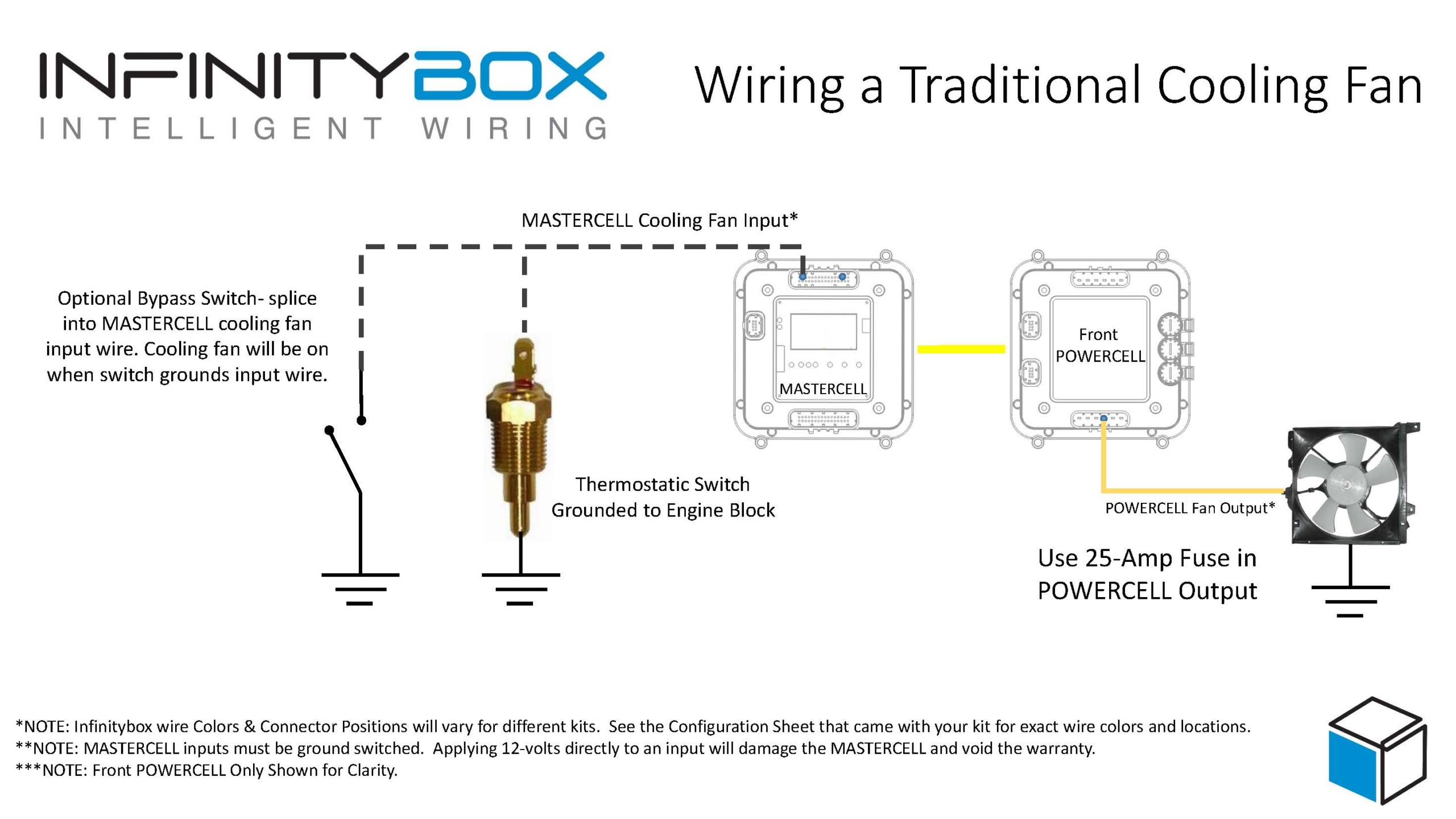
The cooling fan must turn on when the engine temperature reaches a set point.  When the engine temperature cools down, the fan should turn off.   There are two main ways to do this.  Traditionally, you have a thermostatic switch in the radiator or modern ECUs have their own temperature sensors to trigger the fan.

In the first case, you are installing a thermostatic switch into the radiator or the engine block.  Most of these switches have a single terminal on them.  They have a mechanism built inside that electrically connects that single terminal to its case when it reaches a set temperature.  This case is connected to ground by being screwed into the radiator or the engine block.  When the temperature drops, the electrical connection between the single terminal and ground is broken.

The MASTERCELL inputs work by being connected to ground.  To wire the MASTERCELL input to the thermostatic switch, simply connect the input wire for the cooling fan to the terminal on the switch.  See the configuration sheet that came with your kit for the right wire color and connector.

Once you have the input connected to the MASTERCELL, connect the cooling fan output on the POWERCELL to one wire on the cooling fan motor.  The other wire needs to connect to the chassis for ground.  We recommend using a 25-amp fuse in the POWERCELL output to protect this wire.

This picture shows in detail how you connect the MASTERCELL input to the temperature switch and how to connect the POWERCELL output to the cooling fan motor.  You can also download a PDF of the wiring diagram here.

Image of wiring diagram showing how to wire a thermostatic cooling fan switch to the Infinitybox MASTERCELL

Image of wiring diagram showing how to wire a thermostatic cooling fan switch to the Infinitybox MASTERCELL

Most ECU’s have a trigger that is used to control the cooling fan.  They have a sensor that measures engine temperature and they use an external trigger to turn the fan on and off.  These cooling fan triggers can either ground switch the cooling fan or they can positive switch the trigger.  The manual for the ECU will describe whether the trigger is ground switched or positive switched.

As described above, the MASTERCELL inputs work by being pulled to ground.  When the ECU ground switches the cooling fan trigger, it internally grounds the wire when it wants the fan on.  In some cases, the voltage on this trigger may float or get pulled to battery voltage when the cooling fan is supposed to be off.  This voltage needs to be blocked from flowing back  into the MASTERCELL input.  To do this, solder a diode in series between the MASTERCELL input and the trigger wire on the ECU.  The recommended diode is a 1N4001 and can be easily purchased on-line.  When installing the diode, the stripe on the diode should face towards the trigger wire on the ECU.  This will not work correctly if the diode is wired in backwards.

If the cooling fan trigger on the ECU positive switches the cooling fan signal, you need to invert this to a ground trigger for the MASTERCELL.  You can do this with a relay.  This link will take you to a diagram showing how to do this.

The easier way to convert the positive switch signal from the ECU to a ground switched signal is to use one of our inVERT Mini modules.  These are small and fit easily into the harness.  This link will take you to more information on the inVERT Mini.

Once you have the MASTERCELL input wired to the trigger on the ECU, you need to wire the POWERCELL output to the fan.  This is done exactly the same way as described above for the thermostatic switch example.  Connect the cooling fan output on the POWERCELL to one wire on the cooling fan motor.  The other wire needs to connect to the chassis for ground.  We recommend using a 25-amp fuse in the POWERCELL output to protect this wire.

This picture shows in detail how you connect the MASTERCELL input to the ECU and how to connect the POWERCELL output to the cooling fan motor.  You can also download a PDF of this wiring diagram at this link.

Image of wiring diagram showing how to wire the cooling fan trigger from an ECU to the Infinitybox MASTERCELL

Image of wiring diagram showing how to wire the cooling fan trigger from an ECU to the Infinitybox MASTERCELL

Sometimes, a customer may want to have a bypass switch that they can use to turn on their cooling fans.  This is usually a toggle switch on the dash that will turn on the fan at any time, even when the engine is not up to temperature.

In the case where you have a temperature switch, you simply wire the bypass switch in parallel.  This means you splice into the MASTERCELL input wire that is going to the temperature switch.  You connect the splice to one side of the bypass switch and you ground the other side of the switch.  You can see this shown in the wiring diagram for the traditional temperature switch case.

If you’re controlling the fan through the ECU, you do the same thing.  You splice into the MASTERCELL input wire for the cooling fan that is going to the ECU.  You connect the splice to one side of the bypass switch and you ground the other side of the switch.

Please let us know if you have any questions about how you wire your cooling fans with our Infinitybox 10 and 20-circuit harness kits.  You can reach out technical support team at (847) 232-1991 or email us at sales@infinitbox.com.  You can also contact our team by clicking this link.