Posts

Wiring the Cooling Fan with the IPM1 Kit

Table of Contents

Overview

Your Infinitybox IPM1 Kit makes it easy to control your cooling fan. The MASTERCELL NGX takes the trigger signal from your temperature switch or ECU. It sends a command over the CAN network to the front POWERCELL to turn the cooling fan on and off. The POWERCELL has the switching and fuse protection built in. This eliminates the need for an external relay and a separate fuse for your cooling fan circuit.

The POWERCELL also soft-starts the cooling fan motor. This reduces the in-rush current when the fan first turns on. Soft-starting lets you drive a larger fan with a smaller gauge of wire. Click here to learn more about the benefits of soft-starting.

There are two main ways to trigger your cooling fan with the MASTERCELL NGX. You can use a traditional thermostatic switch or you can use the trigger from your ECU. The MASTERCELL NGX accepts both ground-switched and high-side switched (12-volt) inputs. This gives you the flexibility to handle either type of trigger without adding external components.

Before you go any further, check the configuration sheet that came with your IPM1 Kit. Your configuration sheet is the single point of truth for the wire colors and connector locations in your system. It will tell you which MASTERCELL NGX input is assigned to your cooling fan and which POWERCELL output drives the fan motor.

Wiring a Thermostatic Switch

The most common way to trigger your cooling fan is with a thermostatic switch. This is a temperature-activated switch that is usually threaded into your radiator or your engine. Inside the switch, there is a bi-metal element that is set for a specific temperature. When the coolant temperature exceeds that set point, the switch closes internally and connects its terminal to ground. When the coolant temperature drops below the set point, the switch opens and disconnects from ground.

This is a ground-switched signal. You are going to connect the MASTERCELL NGX input for your cooling fan directly to the terminal on the thermostatic switch. When the switch closes, it will ground the MASTERCELL NGX input. The MASTERCELL NGX sees this change and sends a command to the front POWERCELL to turn on the cooling fan output. When the switch opens, the MASTERCELL NGX sends a command to turn the output off.

There are two common types of thermostatic switches. The most common type has a single quick-disconnect terminal. This type of switch grounds through its metal body when it threads into the radiator or the engine. You connect the MASTERCELL NGX input wire to that terminal.

The second type has two terminals. Both terminals are isolated from the metal body of the switch. You connect the MASTERCELL NGX input to one terminal and connect the other terminal to ground.
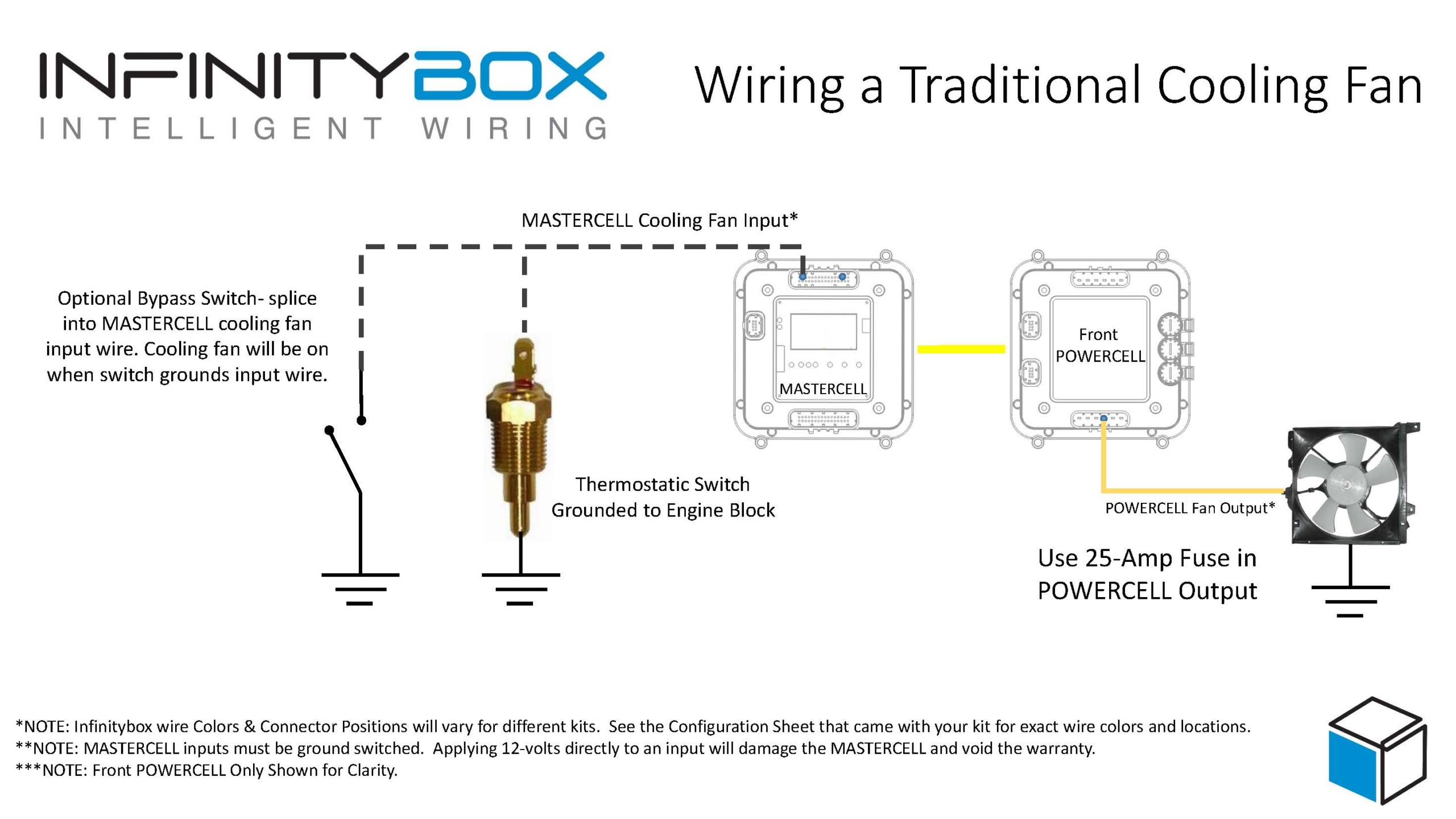
Image of wiring diagram showing how to wire a thermostatic cooling fan switch to the Infinitybox MASTERCELL

Image of wiring diagram showing how to wire a thermostatic cooling fan switch to the Infinitybox MASTERCELL

Here is an important note about temperature switches and temperature senders. There is a big difference between them. A temperature switch turns on and off at a set temperature. A temperature sender is a variable-resistance device that controls your temperature gauge. You cannot connect your cooling fan input on the MASTERCELL NGX to your temperature sender. They are two separate devices with two separate functions.

Wiring the Cooling Fan Trigger from an ECU

Many modern ECUs and EFI systems have a dedicated output to trigger the cooling fan. The ECU monitors the engine coolant temperature through its own sensor and decides when to turn the fan on and off. If your ECU has this capability, you can wire its cooling fan trigger directly to the MASTERCELL NGX instead of using a thermostatic switch.

The important thing to understand is whether your ECU has a ground-switched trigger or a 12-volt (high-side switched) trigger. Check the manual for your ECU to determine which type of trigger it has. The MASTERCELL NGX can handle both types of triggers natively.
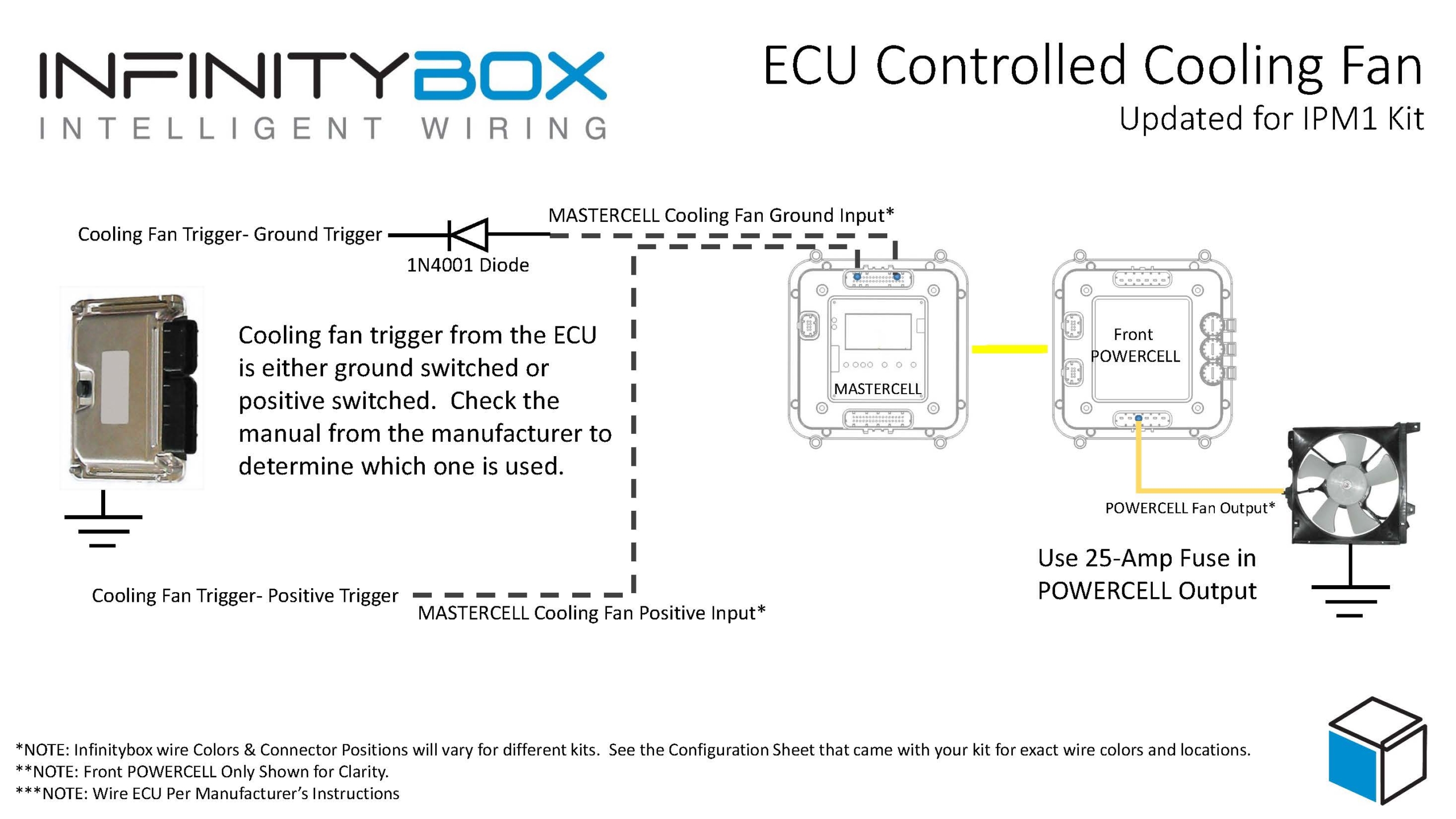
Wiring diagram showing how to wire a thermostatic cooling fan switch to the MASTERCELL NGX in the Infinitybox IPM1 Kit

This diagram shows the connections between the thermostatic cooling fan switch, the MASTERCELL NGX, and the front POWERCELL in the Infinitybox IPM1 Kit.

Ground-Switched Trigger from ECU

If your ECU has a ground-switched cooling fan trigger, it internally connects the trigger wire to ground when it wants the fan on. You are going to connect this trigger to a ground-switched input on the MASTERCELL NGX.

We always recommend isolating any ground-switched input from an external system like an ECU with a 1N4001 diode. The reason is that we do not know what the ECU does with its trigger when it is off. It may let the trigger voltage float or it may pull the trigger up to battery voltage. Either of these conditions could cause erratic behavior on the MASTERCELL NGX input. To isolate the input, solder a 1N4001 diode in series between the MASTERCELL NGX input and the cooling fan trigger wire on the ECU. Install the diode with the anode facing the MASTERCELL NGX. The orientation of this diode is critical and the system will not work correctly if the diode is wired backwards.

12-Volt Trigger from ECU

If your ECU has a 12-volt cooling fan trigger, it outputs battery voltage on the trigger wire when it wants the fan on. You are going to connect this trigger to one of the high-side switched inputs on the MASTERCELL NGX.

The MASTERCELL NGX has the ability to accept 12-volt input signals directly on its high-side switched inputs. There is no need for an inVERT Mini or any other external component to flip this signal. This is one of the key advantages of the MASTERCELL NGX in your IPM1 Kit.

Adding a Bypass Switch

You may want to add a bypass switch that lets you turn on the cooling fan manually at any time. This is usually a simple toggle switch on the dash. It gives you the ability to turn the fan on even when the engine is not up to temperature.

To wire a bypass switch, connect a MASTERCELL NGX ground-switched input to one terminal on the toggle switch. Connect the other terminal to ground. You can assign this to the same cooling fan output on the POWERCELL through your inCODE NGX configuration. When you flip the switch, it grounds the MASTERCELL NGX input and turns on the cooling fan regardless of the state of your thermostatic switch or ECU trigger.

Check your configuration sheet for the specific input assigned to your bypass switch.

Wiring the POWERCELL Output to the Cooling Fan

Once you have the trigger side wired to the MASTERCELL NGX, you need to wire the output side. Connect the cooling fan output on your front POWERCELL to one wire on the cooling fan motor. Connect the other wire on the cooling fan motor to a good chassis ground. Make sure you have a solid metal-to-metal connection with no paint, grease, powder coating, or dirt in the way.

We recommend using a 25-amp fuse in the POWERCELL output to protect the wiring between the POWERCELL and the fan motor. Check your configuration sheet for the specific output and wire color for your cooling fan.

Resources

Our resources section has wiring diagrams for many different ECU and EFI systems. These show the specific connections between the ECU and the MASTERCELL NGX for the cooling fan trigger, fuel pump trigger, and ignition power. Check the blog on our website for your specific ECU.

Click here to contact our team or call us at (847) 232-1991 with any questions about wiring your cooling fan with the IPM1 Kit.

Examples of three different PWM duty cycles

Pulse Width Modulation

Our Infinitybox System is far different from a traditional fuse & relay based wire harness.  There are things that Infinitybox can do that you couldn’t even begin to imagine with a good-old bundle of wire.  One of our biggest goals when we educate people about our products is to de-mystify some of the potentially scary terms that we use.  One that we use a lot is Pulse Width Modulation or PWM.  This is a fancy term for turning something on and off very fast to control power.

We don’t use relays in our POWERCELLs.  Instead, we use MOSFETs.  Yes, I know that is another scary term that we’ll talk about later.  For now, all you need to know is that MOSFETs are solid state stitches.  Unlike relays, there are no mechanical parts in them.  You can turn a MOSFET on and off literally millions of times per second.  You can do that with a relay 2 to 3 times per second before you have to worry about burning up the contacts.

The ability to turn a MOSFET on and off very quickly allows us to control the amount of power coming out of a POWERCELL output.  We do this by using something called Pulse Width Modulation.  PWM is the process of turning an output on and off quickly.  The effective power coming out of the output is proportional to the amount of on time as compared to the off time.  The ratio of the on time versus the off time is called the duty cycle.  So for example, if we turn the output on for half of the cycle time and off for the other half, your duty cycle is 50%.  The effective voltage of your output is approximately 50%.  This picture shows you what we mean.

Examples of three different PWM duty cycles

Examples of three different PWM duty cycles

The three different graphs are 10%, 50% and 90% duty cycle.

Check out this video showing you more about PWM.  If you haven’t seen Colin’s Lab on You Tube before, it is a worthwhile watch.  He is a geek’s geek but makes great videos explaining the basics of electronics.  As part of Make Magazine, his stuff is filled with tons of useful electronics projects, tips and tricks.

So you’re asking yourself, “What does this mean to me”?  “I’m wiring a car, not building circuits.”  Pulse Width Modulation is a very effective and efficient way to control the brightness of lights and the speed of motors.  There is very little heat lost with PWM as compared to using resistors or rheostats.

The Infinitybox system has PWM capability built into the POWERCELL outputs.  We can effortlessly dim lights, create daytime running lights, theater dim interior lights, control fan speeds, and fuel pump speeds.  For those who need that advanced control, it is built right into your system.  No external modules or hardware are required.

Click on this link to contact one of our technical support guys to talk about your specific requirements using Pulse Width Modulation.

Picture of a Spal Cooling used in our 1967 Mustang wired with Infinitybox

Cooling Fan

We’re getting towards the end of the outputs that we need to wire on this 1967 Mustang project.  The cooling fan is next.  We’ll talk in later posts about how to wire the cooling fan triggers to the MASTERCELL input.  This post is going to talk about connecting the POWERCELL output to the fan motor.

In most cars, the cooling fan is connected to the radiator in the front of the car.  When the engine coolant temperature exceeds a set point, the cooling fan turns on to blow outside air through the radiator.  The fan will continue to run until the coolant temperature drops below a set level.

There is a dedicated output on the front POWERCELL in the 20-Circuit Kit that our customer is installing in this 1967 Mustang.  It is output 10, which is the tan wire on the A connector.  Check your specific configuration sheet to confirm the wire color.

Our POWERCELL acts as both the fuse and relay box, except we don’t use relays.  We use what is called a MOSFET.  Think of this as a solid state relay.  Each of the outputs on a POWERCELL can carry 25-amps continuously.  These outputs can also tolerate in-rush currents up to 100-amps.  Like our previous post about headlights and high-beams, you need to consider the in-rush on a motor when you are planning on wiring your car.

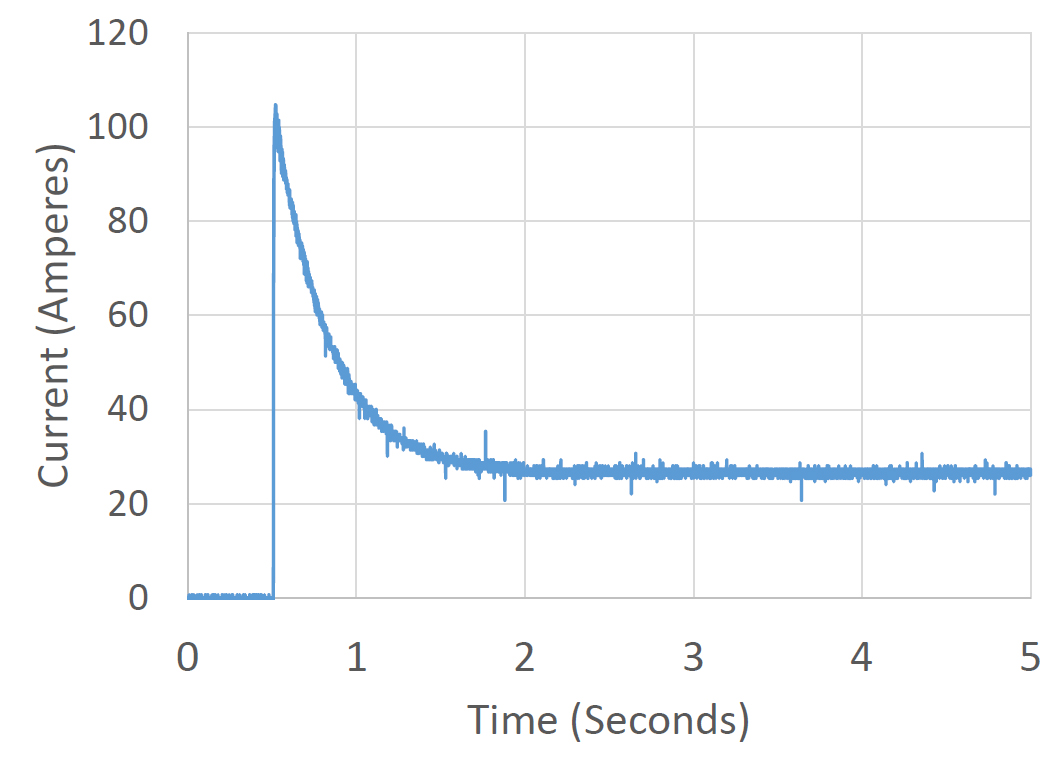
When an electric motor is started, the rotor appears to be stalled at the instant the current is applied.  This stalled current will flow through the motor windings.  As the motor starts to turn, the amount of current flowing to the motor will drop.  When the motor reaches its steady-state speed, the current will level off.  This initial in-rush current can be 4 to 5 times the steady-state current depending on the size of the motor.  The graph below shows an example of this in-rush current.

Graph showing the start-up current of a cooling fan

Graph showing the start-up current of a cooling fan

In the case of this fan motor, the initial in-rush is approximately 100-amps.  Within 2 seconds of starting, the current levels off at about 25-amps.

In most cooling fans, the manufacturer will tell you that you need to use a 70-amp relay to turn the fan on and off.  This is because of the starting current or in-rush current going to the motor.  With your Infinitybox system, you can drive most cooling fans directly without adding an external relay.  The outputs used in the POWERCELL outputs are designed to handle this in-rush current.

In addition to just handling the in-rush current, we use an extra trick to help manage this in-rush current.  As mentioned above, we don’t use relays on our outputs.  We use MOSFETs.  MOSFETs can be turned on and off thousands of times per second.  You can’t do that with a relay.  This on and off lets us do something called Pulse-Width Modulation or PWM.  There are two important parts of PWM.  The first is the frequency.  This is how many times you turn the MOSFET on and off each second.  Our PWM frequency is 20,000 Hertz.  The second part is duty cycle.  This is the ratio of the on time over the off time.  A 50% duty cycle would have the output on for the same period of time as it is off.  A 100% duty cycle means that the output is on all the time.  A 0% duty cycle means that the output is off.  This picture shows the PWM pulses and different duty cycles.

Examples of three different PWM duty cycles

Examples of three different PWM duty cycles

By changing the duty cycle, we can control the amount of power going to the fan.  The higher the duty cycle, the more power is coming out of the POWERCELL output.  When we turn on a fan, we soft-start it.  This means that we gradually start the fan over about one second.  This minimizes the in-rush current.

We get lots of questions about cooling fans and whether or not they can be driven directly from the POWERCELL.  Most can.  A good rule of thumb is to look at the gauge of wire on the cooling fan.  If it is 14-AWG or less, you can certainly use our POWERCELL directly.  In most cases, the manufacturer of the fan will publish the running current or steady-state current for the fan.  Most commonly used fans in aftermarket applications draw between 8 and 20-amperes.

In some cases, our customers want to use two large fans to cool their engines.  The two fans together would draw more than the 25-amps maximum of a single output.  In this case,  you can use any of the OPEN outputs on your configuration sheet.  OPEN means that there is no specific function assigned to them.  You can use them as auxiliary outputs.  We’ll talk about wiring the cooling fan triggers to the MASTERCELL in a few more posts.

DC fan motors have a direction to them.  One of the fan wires will connect to the POWERCELL output and provide battery power to the motor.  The second wire must be connected to ground.  You must check the manual that came with your fan to determine which wire is power and which is ground.  You can also watch the rotation of the motor.  Most fan manufacturers put an arrow that indicates the correct direction that it should spin.  If the fan spins in the wrong direction, reverse the wires.

You can splice the POWERCELL output wire to the wires on the fan in the same way that we described in our headlight post.  You can get to that post by clicking this link.

Keep watching for updates on this 1967 Mustang wiring job with our 20-Circuit Kit.  If you have questions or comments, you can click on this link to get in touch with our team.