
Posts

Holley Terminator X EFI System

Wiring the Holley Terminator EFI with the IPM1 Kit

Our Infinitybox system can power any ignition and fuel injection system out there. This post covers how to wire the Holley Terminator EFI system with our new IPM1 Kit featuring the MASTERCELL NGX. The wiring approach covered here also applies to the Holley Terminator X and Terminator X MAX systems. We will cover the differences between these systems below. If you have one of our Legacy 20-Circuit Kits, click here to get to the wiring details for that system.

We have blogged before about the Dominator and given detailed instructions on how to wire that system with our 20-Circuit Kit. You can see that here.

Table of Contents

Overview

Holley makes several versions of the Terminator EFI system. The original Terminator EFI is a self-learning throttle body injection system. The Terminator X is a multi-port fuel injection system designed for LS and LT engine swaps. The Terminator X MAX adds drive-by-wire throttle body control to the Terminator X platform. All three systems use the same types of trigger signals for the fuel pump and cooling fans. That means the wiring approach with your Infinitybox IPM1 Kit is the same across the entire Terminator family.

Your Infinitybox IPM1 Kit is going to provide the ignition power to the Holley ECU. It is also going to take the fuel pump trigger signal from their ECU and the cooling fan trigger. These two triggers will go to the MASTERCELL NGX which will send signals to the POWERCELL in the front of the car for the cooling fan and the POWERCELL in the rear of the car for the fuel pump. This eliminates the need to add external relays because they are switched from inside the POWERCELLs. This also eliminates the need to run high-current wiring from the Holley Terminator EFI system to the front and back of the car. Those signals are sent through our CAN cable.

Before You Start

Before we go any farther, it is very important that you completely read and fully understand the manual that came with your Holley system. There are many different parts of properly installing these systems. The wiring is just one step. Here are links to the Holley manuals:

Once you have read and understand their manual, you must make all of the constant power and ground connections necessary for their system to work. There are multiple constant power feeds that must be wired directly to the battery and multiple ground connections. You must also wire in all of the other connections including the coil, tach, O2 sensors and others. Their manual will cover these details.

Connection Summary

Here are the points where your IPM1 Kit will connect to the Holley Terminator EFI system. These same connection points apply to the Terminator X and Terminator X MAX:

  1. The ignition output on your POWERCELL will supply the key-on power to their system.
  2. Their system will trigger the fuel pump output on your rear POWERCELL through the MASTERCELL NGX.
  3. Their system will trigger the cooling fan output on your front POWERCELL through the MASTERCELL NGX.
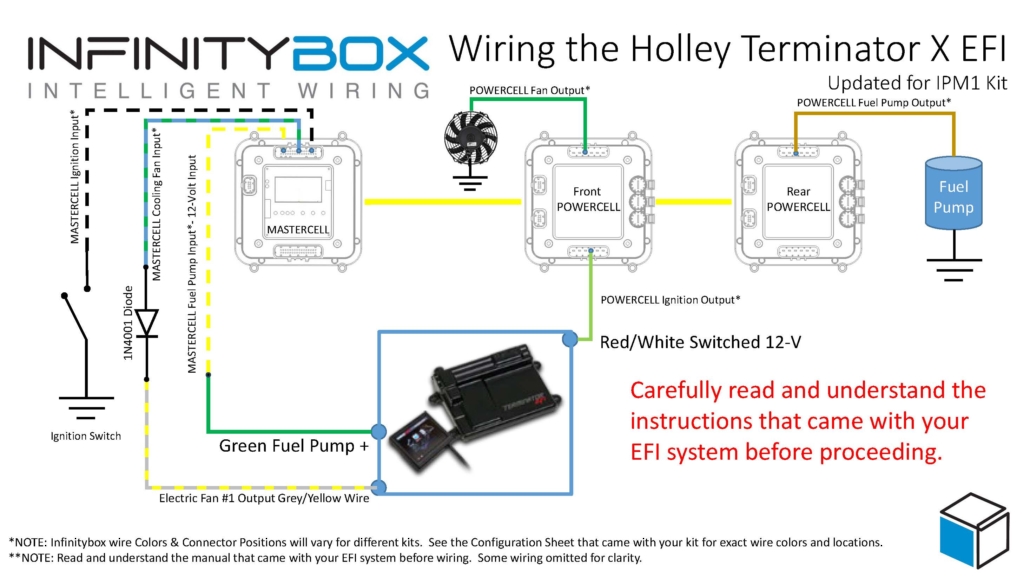

Infinitybox wiring diagram showing how to wire the Holley Terminator EFI with the IPM1 Kit and MASTERCELL NGX including fuel pump and cooling fan connections

Wiring diagram showing the connections between the Holley Terminator EFI and the Infinitybox IPM1 Kit with the MASTERCELL NGX. This diagram also applies to the Holley Terminator X and Terminator X MAX systems.


You can download a PDF version of this wiring diagram by clicking on this link.

Wiring the Ignition Power

Let’s start with the key-on ignition power. This connection is the same across the original Terminator, the Terminator X and the Terminator X MAX. Check your configuration sheet and find the ignition output wire. In most cases, this is the light-green wire on the front POWERCELL. System configurations may vary so check the configuration sheet that came with your kit. The POWERCELL ignition output wire is going to connect to the red wire with the white stripe in the Holley ECU harness.

Wiring the Fuel Pump Trigger

The following section covers the fuel pump wiring for the original Holley Terminator EFI. If you have a Terminator X or Terminator X MAX, skip to the Terminator X section below for the details specific to your system.

Next, you need to connect the fuel pump trigger. In the ECU harness, there is a green fuel pump wire. This wire supplies 12-volts to drive a pump directly or to drive a relay coil.

The MASTERCELL NGX in the IPM1 Kit has both ground-switched and high-side switched inputs. The high-side switched inputs accept a 12-volt signal directly. This means you can connect the green fuel pump wire from the Holley Terminator harness directly to a high-side input on the MASTERCELL NGX. There is no need for an inVERT Mini or an external relay to flip this signal. This is one of the key advantages of the MASTERCELL NGX over our legacy MASTERCELL.

Check the configuration sheet that came with your kit. Find the MASTERCELL NGX input for your fuel pump. Confirm the wire color on your configuration sheet as different systems may have different wire colors.

There are several advantages of using the Infinitybox system to control the fuel pump directly from the Holley Terminator harness. First, we can disable the fuel pump as a security measure if you have our inLINK Radio upgrade. More importantly, having the Infinitybox system control the fuel pump means that you have to run less wire in the car. The MASTERCELL NGX is located close to the EFI system. The rear POWERCELL is mounted near the fuel pump in the tank. There is no extra fuel pump wiring required to make it work.

Wiring the Cooling Fan Trigger

The following section covers the cooling fan wiring for the original Holley Terminator EFI. If you have a Terminator X or Terminator X MAX, skip to the Terminator X section below for the details specific to your system.

Lastly, you need to wire the cooling fan trigger from the Holley Terminator EFI system to your MASTERCELL NGX. The gray wire with the black stripe in the Holley harness is the cooling fan trigger. This is a ground-switched signal so it can connect directly to a ground-switched input on the MASTERCELL NGX.

We recommend installing a 1N4001 diode in series between the MASTERCELL NGX input and the cooling fan trigger on the Holley harness. This diode acts as a one-way valve for the electrical signal. It protects the MASTERCELL NGX input from any voltage surges or back-feeds that could come from the ECU. You can get a 1N4001 diode from any electronics supplier.

Please note that the orientation of the diode is very important. The anode side of the diode connects toward the MASTERCELL NGX and the cathode side connects toward the Holley ECU. The cathode is the side of the diode with the stripe. The stripe on the diode should be on the ECU side of the connection, facing away from the MASTERCELL NGX. Check the wiring diagram above for the correct orientation.

There are several advantages to using the Infinitybox system to control the cooling fan directly off of the Holley Terminator harness. First, you do not need to add a relay. That is built into the POWERCELL. Second, our cooling fan outputs are set to soft-start the motor. Click here to learn more about the benefits of soft-starting.

How It All Works Together

When you turn the key, the front POWERCELL is going to apply battery power to the ignition input on the Holley Terminator EFI system. When the Terminator wants the fuel pump to turn on, it will send a 12-volt signal to the high-side input on the MASTERCELL NGX. The MASTERCELL NGX will then tell the rear POWERCELL to turn on the fuel pump. When the Terminator wants to turn the cooling fan on, it will send a ground signal to the MASTERCELL NGX. The MASTERCELL NGX will tell the front POWERCELL to turn on the cooling fan.

Terminator X and Terminator X MAX

Holley also makes the Terminator X and the Terminator X MAX. The Terminator X is a multi-port fuel injection (MPFI) system designed for LS and LT engine swaps. The Terminator X MAX adds drive-by-wire throttle body control. Both of these systems connect to the Infinitybox IPM1 Kit using the same wiring approach described above.

Fuel Pump

The Terminator X and Terminator X MAX have a green fuel pump wire that supplies 12-volts. This is the same type of signal as the original Terminator. Connect this green wire directly to a high-side input on the MASTERCELL NGX. There is no need for an inVERT Mini or an external relay. Please note that the Holley manual states that this green wire can power a fuel pump directly if it draws less than 15 amps. When you are using our Infinitybox system, you are not powering the pump from this wire. You are using it as a trigger signal to the MASTERCELL NGX. The rear POWERCELL will supply the power to run the fuel pump.

The Terminator X also has a separate fuel pump control output on Pin C5 of the I/O connector. This is a dark-blue wire that provides a low-current ground signal. If you prefer to use this output instead of the green wire, you can connect it to a ground-switched input on the MASTERCELL NGX with a 1N4001 diode for protection. Either approach will work. Consult the manual that came with your Terminator X or Terminator X MAX for the details on these wires and their connector locations.

Cooling Fans

The Terminator X and Terminator X MAX have dedicated cooling fan outputs on their 8-pin I/O connector. These are ground-switched signals that trigger external relays. Since these are ground signals, they connect directly to ground-switched inputs on the MASTERCELL NGX. Install a 1N4001 diode in series for protection, just like the original Terminator. The orientation of the diode is the same. The stripe on the diode faces away from the MASTERCELL NGX, toward the ECU.

The Terminator X and Terminator X MAX support two separate cooling fan outputs from the I/O connector. If you have a dual-fan setup, you can connect both fan outputs to separate inputs on the MASTERCELL NGX and control them independently. This gives you the ability to stage your cooling fans based on the temperature thresholds that you set in the Holley software.

Ignition Power

The key-on ignition power connection is the same for the Terminator X and Terminator X MAX. Connect your POWERCELL ignition output to the red wire with the white stripe in the Holley harness. Always check your Infinitybox configuration sheet and the Holley manual to confirm wire colors for your specific system.

Legacy 20-Circuit Kit vs. IPM1 Kit

If you have one of our Legacy 20-Circuit Kits, the wiring for the Holley Terminator EFI is slightly different. The legacy MASTERCELL only has ground-switched inputs. That means you need an inVERT Mini or an external relay to convert the 12-volt fuel pump trigger from the Holley harness to a ground signal for the MASTERCELL input. Click here to get to the Legacy 20-Circuit Kit wiring details for the Holley Terminator EFI.

The MASTERCELL NGX in the IPM1 Kit eliminates the need for that extra component. Its high-side switched inputs accept 12-volt signals directly. The IPM1 Kit also includes built-in low-current indicator outputs on the MASTERCELL NGX for your dash indicators and the system is fully programmable and configurable by the customer using our inCODE NGX software.

Questions

If you have questions about this wiring diagram or wiring anything else with our Infinitybox system, click on this link to contact a member of our team.

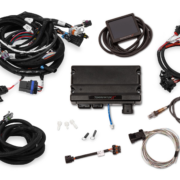
Picture of the Holley Sniper EFI System

How to Wire the Holley Sniper EFI with the Infinitybox IPM1 Kit

Until recently, electronic fuel injection was completely out of the hands of your typical automotive enthusiast. Over the past years, many different companies have introduced powerful and elegant systems to bring the benefits of EFI to anyone. Holley’s Sniper EFI system is one of the most popular. It is a cost-effective throttle body EFI system that can handle up to 650 horsepower and can be tuned without a laptop. Wiring the Holley Sniper EFI system is a breeze with our Infinitybox Intelligent Power Management Kit, the IPM1. This blog post will take you through the details.

Note: This post covers wiring the Holley Sniper EFI with our current IPM1 Kit and the MASTERCELL NGX. If you are wiring the Sniper with our Legacy 20-Circuit Kit, click here to see our original Holley Sniper EFI wiring guide.

Table of Contents

What Changed: IPM1 Kit vs. the Legacy 20-Circuit Kit

If you are familiar with our earlier blog posts, you may have seen our original guide for wiring the Holley Sniper EFI with our Legacy 20-Circuit Kit. We have replaced that kit with the IPM1 Kit, which includes our new MASTERCELL NGX. There are some important differences that simplify how you wire the Sniper EFI.

The biggest change is that the MASTERCELL NGX has both ground-switched and high-side switched inputs. Our Legacy 20-Circuit Kit only had ground-switched inputs on the MASTERCELL. If a trigger from an aftermarket system like the Sniper sent a 12-volt signal, you had to install an inVERT Mini inline to flip that signal to a ground trigger. With the MASTERCELL NGX, high-side switched inputs are built in. The fuel pump trigger from the Sniper EFI is a 12-volt signal. You can now connect it directly to a high-side input on the MASTERCELL NGX without needing an inVERT Mini. This saves you a component and simplifies your wiring.

The MASTERCELL NGX also includes dedicated low-current indicator outputs that can directly drive dash indicators like your turn signal indicators, high-beam indicator, and gauge illumination. On top of that, the MASTERCELL NGX is fully programmable and configurable by the customer.

Wiring the Holley Sniper EFI System with your Infinitybox IPM1 Kit

Our Infinitybox system can interface with any electronic fuel injection system on the market. Wiring the Holley Sniper EFI is as simple as wiring their Terminator or their Dominator. Click on this link to get to the details of wiring the Holley Terminator. Click on this link to get to the details of wiring the Holley Dominator.

Before you start wiring the Holley Sniper EFI, you must thoroughly read and understand the instructions that came with your kit. This link will take you to the Holley manual. Note that this blog post is just going to cover wiring ignition power from your Infinitybox system and wiring the fuel pump and cooling fan. The Holley manual will cover the rest of the wiring details.

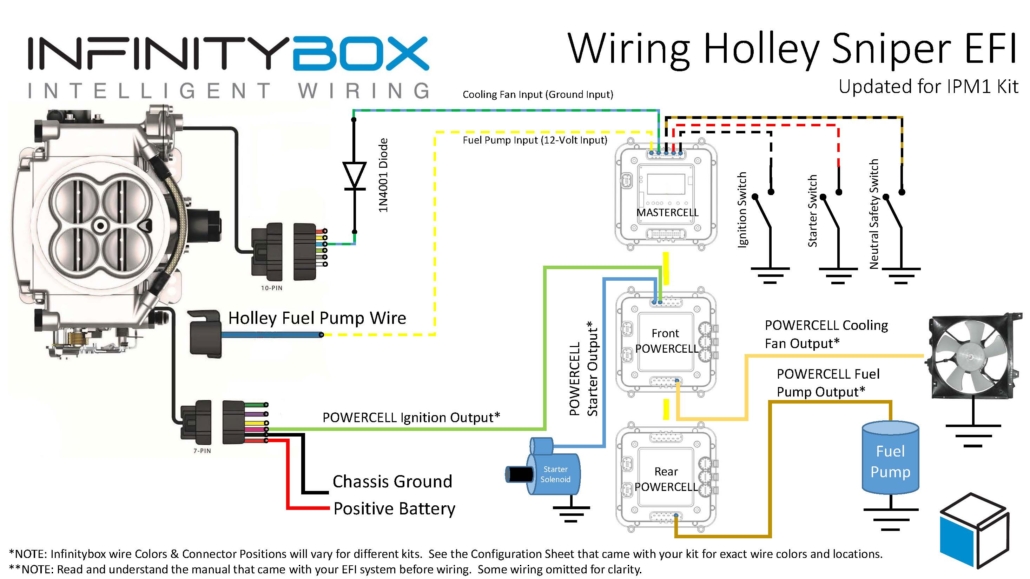
This diagram shows you the connections between your Holley Sniper EFI and your Infinitybox IPM1 Kit with the MASTERCELL NGX.


Wiring diagram showing how to connect the Holley Sniper EFI to the Infinitybox IPM1 Kit with the MASTERCELL NGX

Wiring diagram showing the connections between the Holley Sniper EFI and the Infinitybox IPM1 Kit with the MASTERCELL NGX, including the fuel pump trigger on a high-side input and the cooling fan trigger with a 1N4001 isolation diode.

Battery Power and Ground

First things first, you need to get battery power and ground to the Sniper. The red wire in their 7-pin connector must go directly to the positive terminal on your battery. The black wire in their 7-pin connector must go to ground. As we discuss in other blog posts, 90% of all electrical problems relate to a bad ground. Make sure that you have a solid metal-to-metal connection to your chassis with no paint, grease, powder coating, or dirt in the way.

Ignition Power to the Sniper EFI

Next, you need to bring ignition power from your POWERCELL to the pink wire on their 7-pin harness. In most Infinitybox systems, this is the light-green wire on your front POWERCELL but check your configuration to be sure. This POWERCELL output will supply battery power to the Sniper whenever you have the ignition switch on.

Wiring the Cooling Fan Trigger from the Holley Sniper EFI

Next, you need to connect the MASTERCELL NGX input for your cooling fan to the light-blue wire on the Sniper 10-pin harness. The cooling fan trigger from the Sniper is a ground-switched output. Even though the MASTERCELL NGX accepts ground-switched inputs directly, we always recommend isolating any ground-switched input from an external system like the Sniper EFI. The reason is that we do not know what the Sniper does with its trigger when it is off. It may let the trigger float or pull it up to battery voltage. Either of these conditions could cause erratic behavior on the MASTERCELL NGX input.

To isolate the input, you must install a 1N4001 diode in series between the MASTERCELL NGX input and the cooling fan trigger on the Holley harness. Install the diode with the anode facing the MASTERCELL NGX. Note that the orientation of this diode is critical. Check the diagram above for the correct orientation of the stripe on the diode.

There are several advantages to using the Infinitybox system to control the cooling fan directly off of the Sniper harness. First, you do not need to add a relay. That is built into the POWERCELL. Second, our cooling fan outputs are set to soft-start the motor. Click here to learn more about the benefits of soft-starting.

Wiring the Fuel Pump Trigger from the Holley Sniper EFI

Next, it is time to wire the fuel pump. The dark-blue wire on the 7-pin connector is the fuel pump trigger. This is a 12-volt signal from the Sniper. With the MASTERCELL NGX in your IPM1 Kit, you can connect this fuel pump trigger directly to one of the high-side switched inputs on the MASTERCELL NGX. There is no need for an inVERT Mini. The MASTERCELL NGX has the equivalent of that circuit built into its high-side inputs. This is one of the key improvements over the Legacy 20-Circuit Kit, which required an inVERT Mini inline to convert this 12-volt trigger to a ground signal.

The diagram above shows you how to connect the dark-blue fuel pump trigger wire from the Sniper directly to the high-side input on the MASTERCELL NGX.

There are several advantages to using the Infinitybox system to control the fuel pump directly from the Sniper harness. First, we can disable the fuel pump as a security measure if you have our inLINK Radio upgrade. More importantly, having the Infinitybox system control the fuel pump means that you have to run less wire in the car. The MASTERCELL NGX is located close to the EFI system. The rear POWERCELL is mounted near the fuel pump in the tank. There is no extra fuel pump wiring required to make it work.

Summary

Wiring the Holley Sniper EFI system with your Infinitybox IPM1 Kit and the MASTERCELL NGX is straightforward. The high-side switched inputs on the MASTERCELL NGX eliminate the need for an inVERT Mini on the fuel pump trigger, which simplifies your wiring. Remember to isolate the ground-switched cooling fan trigger with a 1N4001 diode to protect the MASTERCELL NGX input.

You can download a PDF of our wiring diagram by clicking this link.

Click this link to contact our team with any questions about how our Infinitybox IPM1 Kit can streamline your wiring projects.

Wiring the Holley HP EFI System

This blog post goes through the details of wiring the Holley HP EFI System with our Infinitybox 20-Circuit Kit.  We will show you the ease and simplicity of wiring your EFI system with Infinitybox.  The wiring is simple and short and you can eliminate the need for external relays.  We’ll go through the key steps and give you a wiring diagram that shows you all the details to wire your Holley HP EFI Engine Management System with our Infinitybox system.

Before we get too far, you must thoroughly read and understand the instructions that came from Holley to install the HP EFI system.  Please consult their website to get the instillation instructions.  The other important thing to consider here is that we are going to show you how to connect your Infinitybox wiring system to the Holley HP.  This will include wiring the key-on ignition power, the cooling fan trigger and the fuel pump trigger.  Consult the Holley manual for all details regarding primary power from the battery, coil wiring, injector wiring, sensor wiring and grounds.  This diagram shows you the connections between your Infinitybox system and the Holley HP ECU.

Picture of wiring diagram showing how to wire Holley HP EFI system with the Infinitybox wiring system

Picture of wiring diagram showing how to wire Holley HP EFI system with the Infinitybox wiring system

Your Infinitybox 20-Circuit Kit powers the key electrical systems in your car.  We’re going to provide the key-on ignition power to the Holley HP system.  You are going to connect your POWERCELL ignition output to the 12V Switched wire in the Holley Harness.  This is their Red/White wire.  In most Infinitybox configurations, your ignition output is the light-green wire on your front POWERCELL but we encourage you to always use your configuration sheet to confirm wire colors in your specific kit.  You can get more details on your configuration sheet by clicking this link.  When you turn on your ignition switch, the POWERCELL will provide the key-on ignition power that the Holley HP needs to run.  You can learn more about wiring your ignition switch to your MASTERCELL by clicking this link.

You can use an output your Infinitybox rear POWERCELL to provide the power to your fuel pump.  There are several advantages to using the fuel pump output on your POWERCELL.  First, you do not need to use a relay.  The POWERCELL has the capability to control 25-amps to your fuel pump directly without a relay.  The second advantage is that you can power the fuel pump from the POWERCELL in the back of your car.  This keeps your wiring short and easy to install.  The Holley HP ECU has a fuel pump trigger that you can connect into the MASTERCELL input for your fuel pump.  The Holley fuel pump signal is +12 volts so you must use one of our inVERT Minis to flip this to a ground trigger to go into the MASTERCELL.  You can learn more about the inVERT Mini at this link.

You can also use an output on your Infinitybox front POWERCELL to power your cooling fan.  You get same benefits with your cooling fan as you do your fuel pump.  Your wiring is shorter and you do not need to use an external relay to control the fan.  You can either use a thermostatic switch on the engine or you can have the Holley HP ECU send the MASTERCELL the signal to control the fan.  This link will show you how wire in a thermostatic switch.  The Holley HP ECU has programmable outputs that can be used to signal the MASTERCELL input for the cooling fan.  You need to use one of their “G” or ground switched outputs and need to configure this within their software tool.  You must use a diode to isolate the output on the Holley HP from the MASTERCELL.  See the details in our wiring diagram.

Those are all of the connections that you need to make between your Infinitybox 20-Circuit Kit and the Holley HP EFI system.  You can download a PDF of this wiring diagram by clicking this link.

Click on this link to contact our technical support team if you have any questions about wiring your Holley HP EFI system with Infinitybox.

Picture of the Holley Sniper EFI System

Wiring the Holley Sniper EFI

Until recently, electronic fuel injection was completely out of the hands of your typical automotive enthusiast.  Over the past years, many different companies have introduced powerful and elegant systems to bring the benefits of EFI to anyone.  Holley recently introduced their Sniper EFI system.  This is a cost-effective EFI system that can handle up to 650 horsepower and can be tuned without a laptop.  Wiring the Holley Sniper EFI system is a breeze with our Infinitybox 10-Circuit or 20-Circuit Kits.  This blog post will take you through the details.

If you are using our Infinitybox Intelligent Power Management Kit IPM1, please click on this link to wire the Holley Sniper.  The following post covers wiring with our Legacy 20-Circuit Kit.

Our Infinitybox system can interface with any electronic fuel injection system in the market.  Wiring the Holley Sniper EFI is as simple as wiring their Terminator or their Dominator.  Click on this link to get to the details of wiring the Holley Terminator.  Click on this link to get to the details of wiring the Holley Dominator.

Before you start wiring the Holley Sniper EFI, you must thoroughly read and understand the instructions that came with your kit.  This link will take you to the Holley manual.  Note that this blog post is just going to cover wiring ignition power from your Infinitybox system and wiring the fuel pump & cooling fan.  The Holley manual will cover the rest of the wiring details.

This diagram shows you the connections between your Holley Sniper EFI and your Infinitybox system.

Picture of the Infinitybox wiring diagram showing how to wire the Holley Sniper EFI System with the Infinitybox 20-Circuit Kit

Picture of the Infinitybox wiring diagram showing how to wire the Holley Sniper EFI System with the Infinitybox 20-Circuit Kit

First things first, you need to get battery power and ground to the Sniper.  The red wire in their 7-pin connector must go directly to the positive terminal on your battery.  The black wire in their 7-pin connector must go to ground.  As we discussed in other blog posts, 90% of all electrical problems relate to a bad ground.  Make sure that you have a solid metal-to-metal connection to your chassis with no paint, grease, powder coating or dirt in the way.

Next, you need to bring ignition power from your POWERCELL to the pink wire on their 7-pin harness.  In most Infinitybox systems, this is the light-green wire on your front POWERCELL but check your configuration to be sure.  This POWERCELL output will supply battery power to the Sniper whenever you have the ignition switch on.

Next, you need to connect your MASTERCELL input for your cooling fan to the light-blue wire on the Sniper 10-pin harness.  You must install a diode in series between the MASTERCELL input and the cooling fan trigger on the Holley harness.  We recommend a 1N4001 diode.  Note that the orientation of this diode is critical.  Check the diagram above for the correct orientation of the stripe on the diode.

There are several advantages to using the Infinitybox system to control the cooling fan directly off of the Sniper harness.  First, you do not need to add a relay.  That is built into the POWERCELL.  Second, our cooling fan outputs are set to soft-start the motor.  Click here to learn more about the benefits of soft-starting.

Next, it is time to wire the fuel pump.  The dark-blue wire on the 7-pin connector is the fuel pump trigger.  This is a 12-volt signal so it cannot be directly connected to the MASTERCELL input for the fuel pump.  You must use an inVERT Mini to flip this 12-volt signal to a ground signal for the MASTERCELL.  This link will get you more details on the inVERT Mini.  The diagram above will show you how to wire the inVERT Mini between the Sniper EFI harness and your MASTERCELL input.

There are several advantages of using the Infinitybox system to control the fuel pump directly from the Sniper harness.  First, we can disable the fuel pump as a security measure if you have our inLINK Radio upgrade.  More importantly, having the Infinitybox system control the fuel pump means that you  have to run less wire in the car.  The MASTERCELL is located close to the EFI system.  The rear POWERCELL is mounted near the fuel pump in the tank.  There is no extra fuel pump wiring required to make it work.

One quick note about the Sniper if you are using our One-Button Start feature.  It takes their system 2.5-seconds to boot up.  It is only after that time that the fuel-pump will start to prime.  Our standard One-Button Start feature is set for a 1-second fuel pump prime.  We can easily extend our fuel pump prime time to accommodate the timing required for the Sniper EFI system.  Please talk to Infinitybox technical support when you place your order to make this change.

Wiring the Holley Sniper EFI system with your Infinitybox 20-Circuit Kit will get you all of the functionality that you need to control your engine.  You can download a PDF of our wiring diagram by clicking this link.

Click this link to contact our team with any questions about how our Infinitybox system can streamline your wiring projects.

Holley Terminator EFI

Our Infinitybox system can power any ignition and fuel injection system out there.  We recently received a request for a wiring diagram for the Holley Terminator EFI system.  We’ve blogged before about the Dominator and given detailed instructions on how to wire that system with our 20-Circuit Kit.  You can see that here.  This post will cover how to connect to the Holley Terminator EFI system with our 20-Circuit Kit  or our new IPM1 Kit.

Holley ECU

Holley ECU

Holley Terminator EFI System

This link will take you to more information on the Holley Terminator EFI system.  

Our Infinitybox 20-Circuit Kit is going to provide the ignition power to the Holley ECU.  It is also going to take the fuel pump trigger signal from their ECU and the cooling fan trigger.  These two triggers will go to the MASTERCELL which will send signals to the POWERCELL in the front of the car for the cooling fan and the POWERCELL in rear of the car for the fuel pump.  This eliminates the need to add external relays because they are switched from inside the POWERCELLs.  This also eliminates the need to run high-current wiring from the Holley Terminator EFI system to the front and back of the car.  Those signals are sent through our CAN cable.

Before we go any farther, it is very important that you completely read and fully understand the manual that came with your Holley Terminator EFI system.  There are many different parts of properly installing this system, the wiring is just one step.

Once you have read and understand their manual, you must make all of the constant power and ground connections necessary for their system to work.  There are multiple constant power feeds that must be wired directly to the battery and multiple ground connections.  You must also wire in all of the other connections including the coil, tach, O2 sensors, etc.  Their manual will cover these details.

As an overview, here are the points where your 20-Circuit Kit will connect to the Holley Terminator EFI system.

  1. The ignition output on your POWERCELL will supply the key-on power to their system.
  2. Their system will trigger the fuel pump output on your rear POWERCELL from the MASTERCELL.
  3. Their system will trigger the cooling fan output on your front POWERCELL from the MASTERCELL.

This picture shows you the overview of the connections between your Infinitybox 20-Circuit Kit and the Holley Terminator EFI system.

Picture of Infinitybox wiring diagram showing how to wire the Holley Terminator with the 20-Circuit Kit.

Picture of Infinitybox wiring diagram showing how to wire the Holley Terminator with the 20-Circuit Kit.

You can download a PDF of this wiring diagram by clicking this link.

Let’s start with the key-on ignition power.  Check your configuration sheet and find the ignition output wire.  In most cases, this is the light-green wire on the front POWERCELL.  System configurations may vary so check the configuration sheet that came with your kit.  The POWERCELL ignition output wire is going to connect to the red wire with the white stripe in the Holley ECU harness.

Next, you need to connect the fuel pump trigger.  In the ECU harness, there is a green fuel pump wire.  This wire supplies 12-volts to drive a pump directly or to drive a relay coil.  To connect this to the MASTERCELL input, you must convert this 12-volt signal to a ground signal.  You can do this with one of our inVERT Mini’s.  Alternately, you can use a relay to flip this 12-volt signal to a ground signal for the MASTERCELL.  This link will take you to a diagram showing you how to use a relay if you don’t want to use an inVERT Mini.

Check the configuration sheet that came with your kit.  Find the MASTERCELL input wire for your fuel-pump.  In most cases this is input 19 which is the tan wire with the yellow stripe.  Check your configuration sheet to confirm this as different systems may have different wire colors.

Lastly, you need to wire the cooling fan trigger from the Holley Terminator EFI system to your MASTERCELL.  Check your configuration sheet for the color of this wire.  In most systems it is the blue wire with the yellow tracer.

There are additional outputs on the Holley harness.  The gray wire with the black stripe is the cooling fan trigger.  This is a ground-switched signal so you do not need to flip it to connect it to the MASTERCELL.  However, we do recommend using a diode to eliminate the chance of surges coming into the MASTERCELL inputs from the ECU.  A 1N4001 diode will do the job.  You can get these from any electronics source.  Please note that the orientation of the diode is very important.  The stripe on the diode should be on the ECU side of the connection, facing away from the MASTERCELL.

That’s it.  When you turn the key, the front POWERCELL is going to apply battery power to the ignition input on the Holley Terminator EFI system.  When the Terminator wants the fuel pump to turn on, it will send a signal to the MASTERCELL, which will control the fuel pump through the rear POWERCELL.  When the Terminator wants to turn the cooling fan on, it will send a signal to the MASTERCELL.  The MASTERCELL will tell the front POWERCELL to turn on the cooling fan.

If you have questions about wiring diagram or wiring anything else with our Infinitybox system, click on this link to contact a member of our team.

Wiring the Holley Dominator EFI System

EFI systems have been gaining in popularity for years.  Guys want the conveniences, flexibility and power that they get from the engines in modern cars.  Companies have been leveraging technology developed by the large OEMs to bring Electronic Fuel Injection systems to restorations, hot-rods, street rods, resto-mods and component cars.  Our Infinitybox system does the same thing.  We take technology used in practically every new car and bring it to the average guy in his garage.  He gets the conveniences of less wire, more diagnostics and better functionality out of his wiring system.

It is very easy for us to bring the two systems together:  Infinitybox powering EFI.  This is a question that we get a lot.  How do I connect my Infinitybox system to my EFI system?  This post shows you how to connect the Holley Dominator EFI System to the Infinitybox 20-Circuit System.

First things first, Holley has some very important notes and warnings about wiring their system.  Be sure to read their manual thoroughly and follow their instructions.  The most important things are related to good grounds and keeping all signal & data wires away from the coil wires.

You are going to wire the Dominator following their instructions.  There are two simple differences when you connect in the Infinitybox system.

Image of wiring diagram showing how to wire the Holley Dominator EFI System with the Infinitybox System.

Image of wiring diagram showing how to wire the Holley Dominator EFI System with the Infinitybox System.

First, you are going to give the Dominator its key-on power from the Ignition output on the front POWERCELL.  You going to connect the ignition switch to the ignition input on the MASTERCELL.  When you turn on the ignition switch, the MASTERCELL sends a command to one of the POWERCELLs, usually the front, to provide battery voltage to the ignition output.  This is usually the light-green output on the front POWERCELL but always refer to the configuration sheet that came with your Infinitybox kit.

Next, you are going to use the Infinitybox system to power the fuel pump.  There are several advantages to doing this.  First, the Dominator fuel pump output is only capable of delivering 10-amps.  In most cases, you’d need to add a relay to switch the current to the pump.  The POWERCELL is the relay and it is capable of delivering 25-amps.  You won’t need to add a relay for most commercially available pumps.  Second, the fuel pump is switched from the rear POWERCELL, which is mounted in the rear of the car.  You don’t have to run any extra fuel pump wires to the back of the car.  You just wire the fuel pump from the rear POWERCELL.

There is an important warning that must be followed when you wire MASTERCELL inputs to other controllers, like EFI systems.  MASTERCELL inputs are designed to be connected to ground.  This lets us keep the wire bundles small and simplify how you connect to switches.  Applying 12-volts to a MASTERCELL input will damage the Cell and will void its warranty.

In the case of the Holley Dominator EFI system, it puts out 12-volts for the fuel pump trigger.  You can simply convert this 12-volt trigger to a ground trigger with one of our inVERT Mini modules or a relay.  The application note that we created for the Holley Dominator EFI system shows using an inVERT Mini.  You can download a simple wiring diagram showing you how to do this with a relay by clicking this link.

You can download a PDF of the application note that shows how to wire the Holley Dominator EFI system with the Infinitybox 20-Circuit Harness by clicking this link.

If you have any questions, please feel free to contact our technical support group at (847) 232-1991 or email us at sales@infinitybox.com.  You can contact our team directly by clicking this link.