
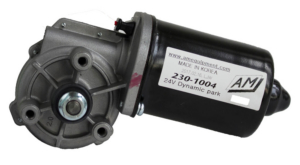
Two distinct families of two-speed wiper motor have been used in automotive applications for decades. They look similar, often have the same number of wires, and serve the same purpose — but they park very differently from each other. The difference is between coast-to-park and dynamic park wiper motors, and if you’re building or restoring a vehicle and adding modern wiper control with the Infinitybox inVIEW Wiper Control Module, you need to know which type you’ve got.
The inVIEW module comes in two versions to match these two motor designs. Picking the wrong one means the wipers won’t park correctly, even if everything else in the system works perfectly. This post explains the difference in plain language, why it matters for the control module, and — most importantly — how to figure out which type you’re working with.
Coast-to-Park vs. Dynamic Park: The Short Version
Coast-to-park motors have a dedicated park terminal. When you turn the wipers off, the controller routes power through that park terminal, and the motor continues to drive (through an internal cam switch inside the motor) until the wiper arms reach their home position. The cam switch then internally breaks the circuit, and the motor stops. Park position can vary by a few degrees because it’s a mechanical stop.
Dynamic park motors don’t park by being driven. Instead, the motor’s brushes are shorted to ground at the park position, creating dynamic braking that holds the wipers electrically in place. There’s no dedicated park drive terminal. The park wire on the harness is actually a sense signal coming from the motor, telling the controller when the motor is at park. Park position is consistent because it’s electrically locked.
AM Equipment, one of the largest wiper motor manufacturers in North America, has a clean technical summary of the conceptual difference on their FAQ page. It’s worth a one-minute read.
Why This Matters for inVIEW
The inVIEW Wiper Control Module manages your wiper motor’s park behavior automatically — but how it does that depends entirely on which motor type it’s connected to.
The coast-to-park version of inVIEW drives the park terminal of your motor with battery voltage whenever the wipers are turned off. The motor’s internal cam switch handles the rest.
The dynamic park version of inVIEW does the opposite. Instead of driving the park terminal, it reads the park wire as a sense input. The module uses that signal to know when the motor has reached park, then releases the wiper circuits so dynamic braking can bring the blades to rest.
If you connect a coast-to-park module to a dynamic park motor (or vice versa), the wipers won’t park correctly. They might continue running, stop in the wrong position, or behave erratically. The good news is that the difference is easy to figure out — you just need to know what to look at.
How to Figure Out Which Motor You Have
Step 1: Check the literature that came with your motor
The fastest and most reliable answer is on paper. If you have:
- The wiper motor’s owner’s manual or installation guide
- A spec sheet from the supplier or manufacturer
- The original packaging or part documentation
…look for terms like “park type,” “park mode,” “cam-switch park,” or “dynamic brake.” A good spec sheet will state the motor type explicitly. This is the first place to look, and in most cases it’s also the last — the answer is usually right there in the literature.
Step 2: Look up the motor by manufacturer and part number
If you don’t have the literature on hand, find the part number stamped or labeled on the motor itself. Most manufacturers — AM Equipment, Bosch, Trico, Lucas, and others — publish technical specs online, and a quick search of the part number will usually pull up the motor type. The manufacturer’s own website is the authoritative source. AM Equipment, for example, publishes detailed wiring diagrams and specifications for every motor in their catalog.
Step 3: Look at the wiring (with caution)
The number of terminals on the motor itself can give you a strong clue. From the motors we’ve worked with most often:
- Coast-to-park motors typically have four terminals: low speed, high speed, park, and ground.
- Dynamic park motors typically have five terminals: low speed, high speed, park out, ground, and a +12V battery input.
Count the terminals on the motor housing itself, not the wires in the harness — connectors and pigtails can be spliced or replaced, so the harness wire count isn’t always reliable.
A few other things worth checking:
- Motor manufacturer markings: Look for branding, stamps, or labels on the motor housing. This is often the fastest path back to documentation.
- The wiper system manual: If your wiper motor came as part of a complete wiper kit (common for hot rod and restoration installations), the kit’s installation manual will usually state the motor type explicitly. Read that before drawing conclusions from terminal counts alone.
We deliberately recommend against guessing based on wire color or by applying power to the motor and watching what happens. The two motor types respond very differently to the same stimulus, and the wrong test can damage the motor or your test setup.
Step 4: Call us
If you’ve gone through the steps above and you’re still not sure, give us a call. We’ve worked with both motor types in dozens of restoration and performance builds, and we can usually get you to an answer in a few minutes based on the make, model, and year of the vehicle — or the manufacturer and part number of the motor.
Call (847) 232-1991 during normal business hours and ask for technical support. We’re glad to walk through it with you — usually takes about five minutes.
The Bottom Line
Both coast-to-park and dynamic park motors are excellent wiper motor designs, and the inVIEW Wiper Control Module supports both. The only thing that matters at order time is matching the version of inVIEW to the motor in your build.
When in doubt:
- Check your motor’s literature.
- Look it up by manufacturer and part number.
- Call us at (847) 232-1991.
We’re here to help you make the right choice.
 Copyright 2026 Infinitybox, LLC. All Rights Reserved.