
inVIEW Standalone: Wiring the 1983–1987 G-Body Wiper Stalk
One of the things we love about the inVIEW Wiper Control Module is how flexible it is. inVIEW is a full member of the Infinitybox ecosystem, working alongside your MASTERCELL, POWERCELL and inTOUCH controls. But it does not have to be. inVIEW also works as a complete standalone wiper controller, and that opens it up to a lot of builders who want modern, reliable two-speed wiper control without committing to a full system.
A great example is the General Motors G-Body steering column. This is a popular column that is easy to transplant into any hot rod, kit car, resto mod, street rod or pro-touring build. GM built millions of them and they have all the modern features that you’d want on a steering column. Pro Steering Columns in San Antonio, Texas is a great source for these columns.
inVIEW Works on Its Own
When you use inVIEW as a standalone module, it does not need to connect to any other Infinitybox product. You wire your steering column switch directly to the inVIEW inputs, give it ignition power and ground, connect your washer pump and your wiper motor, and you are done. inVIEW handles the wiper logic for you.
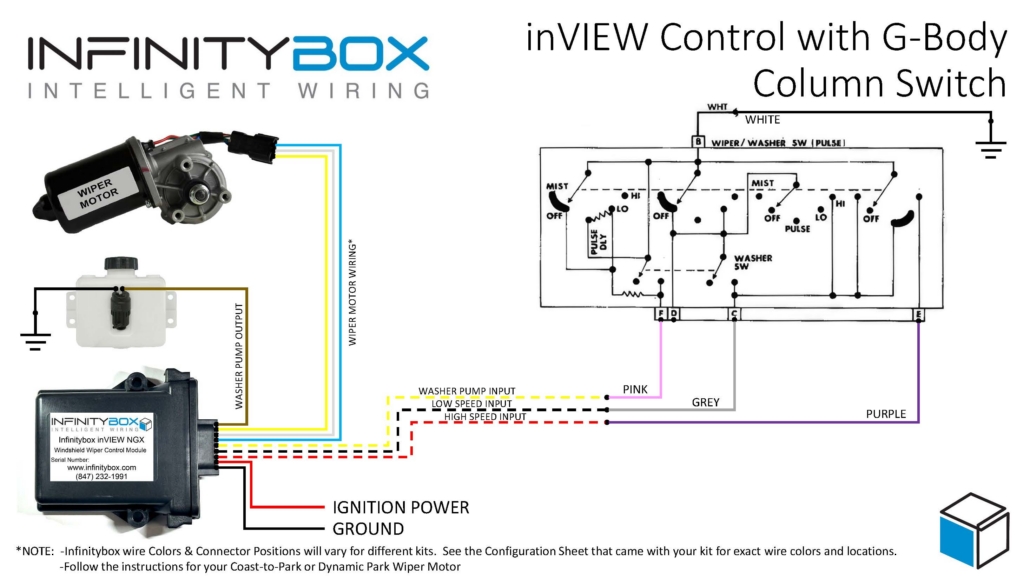
We have put together a wiring diagram specifically for the 1983–1987 G-Body column. It identifies each switch wire by its factory color and maps it to the correct inVIEW input, and it shows the connections for chassis ground, switched ignition power, and the washer pump. A generic wiper motor connection represents the motor side of the system.
Making the Connections
The connections between inVIEW and the G-Body wiper switch connector are simple.
- Ground the White wire. This seems counterintuitive because this was power from the factory. In our case, we need to ground the inputs going to inVIEW. Trust us. Ground the White wire.
- The Grey wire is going to connect to the low speed input on your inVIEW. Check the manual for exact wire colors.
- The Purple wire is going to connect to the high speed input on your inVIEW. Check the manual for exact wire colors.
- The Pink wire is going to connect to the washer pump input on your inVIEW. Check the manual for exact wire colors.
- You are not going to use the Green wire. You can cap this one off.
- Follow the instructions in your inVIEW manual for the rest of the connections to ignition power, ground, the washer pump and the wiper motor.
What You Can Control From the Stalk
Using the factory G-Body stalk, inVIEW gives you:
- Low speed — continuous low-speed wiping.
- High speed — continuous high-speed wiping.
- Washer — activates your washer pump.
- Mist — the mist position drives the high-speed output for as long as you hold it. When you release the stalk, the wipers return to park.
One Thing to Know: No Intermittent From the Stalk
There is one caveat worth calling out up front. When you run inVIEW standalone from the factory G-Body stalk, the intermittent (delay) function is not available. Because of how GM designed this particular control, inVIEW cannot use the stalk’s intermittent position. You still get full low, high, washer and mist control as described above.
Any Wiper Motor Works
inVIEW supports both Coast-to-Park and Dynamic Park wiper motors, so you can wire whichever motor your build uses. The motor-side wiring depends on which type you have, so for those connections, refer to the manual that came with your inVIEW kit.
Not sure which motor you have? Click here to learn more.
Even Easier With the RainGear Harness
If you are running a RainGear Wiper System, the optional inVIEW RainGear harness makes this installation even cleaner. The harness has discrete wires for ignition power, ground, the washer pump, and the three input wires that connect to your steering column switch. You make those connections to your column and power. The same harness includes a lead with the mating connector for the motor that RainGear uses, so the motor side simply plugs in. Connect the harness, plug in the motor, and you are ready to go.
Using Something Other Than a G-Body Steering Column?
This diagram and harness are built specifically for the 1983–1987 G-Body steering column. If you have a different steering column or connector you would like to use with inVIEW, reach out to us. We are always happy to help you figure out the right way to wire it up.
inVIEW gives you clean, modern, two-speed wiper control whether it is part of a full Infinitybox system or running entirely on its own. The G-Body is just one of the many places it fits right in.

 Copyright 2026 Infinitybox, LLC. All Rights Reserved.