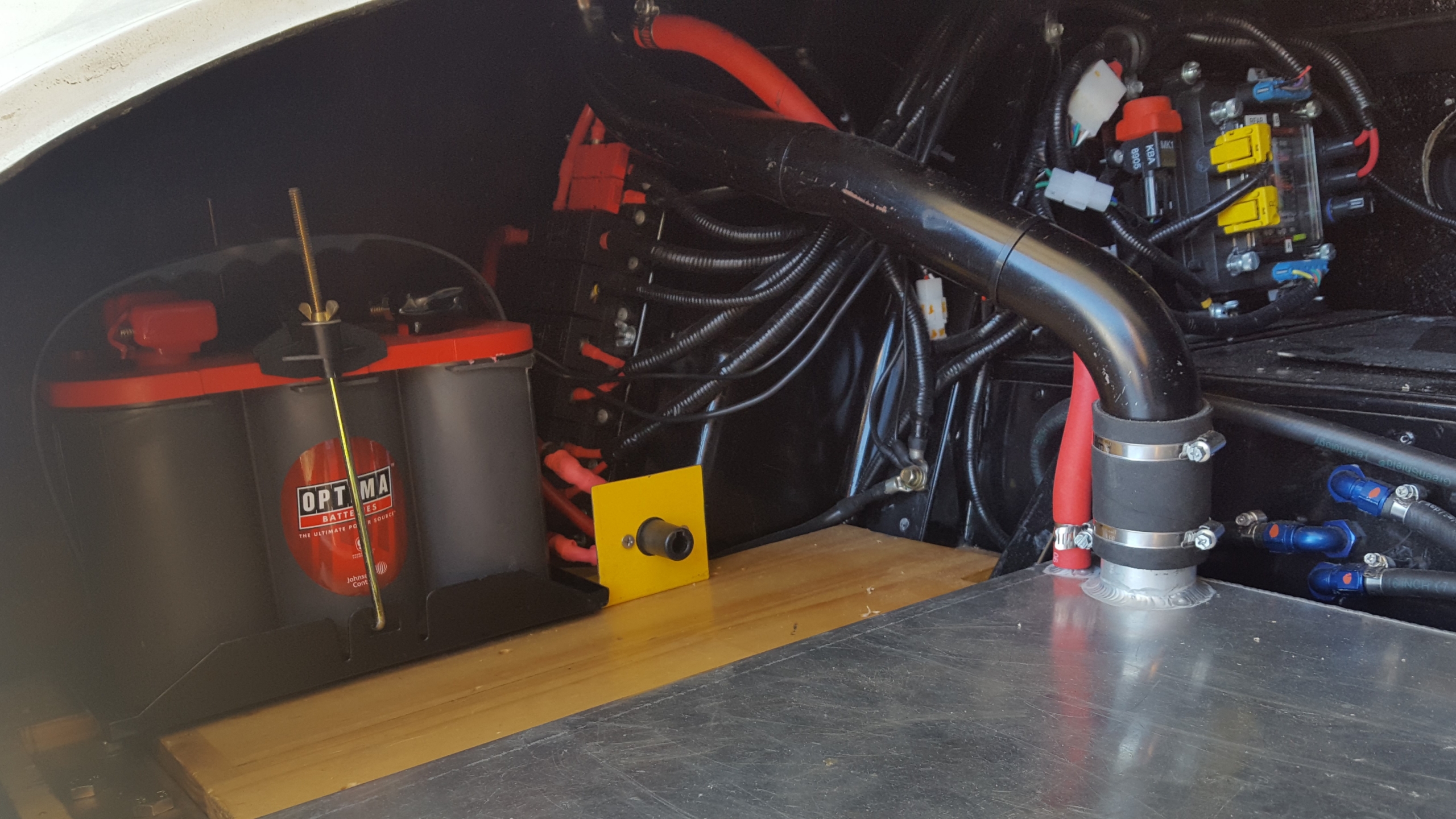
Front shot of the RAESR Tachyon Speed wired with the Infinitybox system.

Supercar Blondie Test Drives Tachyon Speed

Eric Rice and his team at RASER have been getting some great press coverage for their Tachyon Speed.  This is a one-of-a-kind super car.  It’s all electric, it’s styled like a fighter jet and it can put out enough peak power to meet the needs of a small city.  Just like any other car, it needs an electrical wiring system to manage all of the functions in the car.  The RAESR team turned to Infinitybox to get the most advanced electrical system on the market to meet their customers’ needs.

The Tachyon Speed caught the eye of Alex Hirschi, aka Supercar Blondie.  Australian-born Alex is a world renown celebrity in the super car space.  She now calls Dubai her home and was recently listed as one of the top 30 most influential women in the Arab World.  Her blogs, videos and TV appearances have been viewed billions of times by aficionados of exotic and super cars.  She is an expert on all automotive thoroughbreds.  Alex made the trip out to LA to meet with the RASER team and test drive the Tachyon Speed.  She ran the car through its paces on the road.  She also had a chance to play with the touch screens and switch interfaces that are controlled by the Infinitybox system in the car.

The Supercar Blondie team posted a video showing Alex meeting with the RAESR team, touring the car and taking it on the road.  Check out the video below.

We congratulate Eric and his team for what they’ve accomplished with the Tachyon Speed.  We are proud to be a part of this car.

Our Infinitybox system was designed for any type of car, truck or race car.  You may not be building a super car but you can get the same functionality and features in your restoration, street-rod, kit car or Pro-Touring build.  Click this link to contact our team to learn more.

You can learn more about RAESR and the Tachyon Speed by clicking this link.

Wiring Switches in Parallel

Our Infinitybox system is the most powerful and flexible wiring harness available in the market. Our MASTERCELL inputs are flexible and adaptable for practically any application. A customer just asked this question and we thought that it was a great way to show off the flexibility of the MASTERCELL inputs. The customer is wiring the power window switches in his car. He wanted to know if there was a way to wire a parallel switch that would control all 4 windows at the same time. The answer is “yes” and this blog post will show you how to do it.

Our MASTERCELL inputs work by getting connected to ground. This link will take you to an older blog post that goes through the details of how the inputs work and how to connect a switch to them. Since the inputs work by a ground trigger, this gives you a lot of flexibility with your switches.

This picture shows you how to wire in a parallel switch to control multiple inputs simultaneously.

Picture of a wiring diagram showing how to wire two Infinitybox MASTERCELL inputs in parallel

Picture of a wiring diagram showing how to wire two Infinitybox MASTERCELL inputs in parallel

In this example, we’re showing two switches that control the driver’s and passenger’s windows. For the sake of clarity, we’re only showing the front windows and we’re only showing the down action. These switches are labeled Driver Down and Passenger Down in the wiring diagram. You are going to follow the wire colors from your configuration sheet to wire the switches and the power wires that go to the window regulator motors.

To wire in the parallel “master” switch, you are going to connect the MASTERCELL inputs for the Driver’s and Passenger’s switch together and bring them to the parallel switch. The important thing here is that you need to put a diode on each of the wires from the Driver’s and Passenger’s switch. These diodes are electrical check valves. They only let current flow in one direction. They block the flow of current in the other direction. Without these diodes, both the MASTERCELL inputs would be connected together at the parallel switch. They would both turn on with either switch. The diodes electrically isolate the two MASTERCELL inputs so they are operate independently from the individual switches but work together from the parallel switch.

You can source these diodes anywhere. We recommend a 1N4001 diode. These can be purchased easily from Amazon or other on-line retailers. The orientation of the diodes critical. This will not work correctly if they are installed backwards. Note the orientation of the diode symbol in the wiring diagram above. The line on the diode symbol corresponds to the silver line on the case of the diode. Look at the picture below.

Example of a simple diode

Example of a simple diode

We only show the down action for the power windows in this diagram. We also only show 2 window switches. You can join all 4 inputs together through diodes if you want to control your front and rear windows from a single parallel switch. You can also repeat this for the up action of your power windows.

This same approach can be used for other switches like your lighting. We posted a wiring diagram a while ago showing you how to wire your head lights and parking lights from a single switch using a similar arrangement. You can view that blog post by clicking this link.

Click on this link to download a PDF version of this wiring diagram.

Click on this link to contact our technical support team with any additional questions about wiring your car or truck with our Infinitybox system.


1968 Charger wired with the Infinitybox system

1968 Charger Install

We love getting pictures of finished cars from our customers. Most of our customers send the glamour shots of the cars all waxed up, looking pretty. Some of our customers like to show off the details that the rest of the world doesn’t get to see. The detail pictures are our favorites because they show how our customers wired their cars with our Infinitybox system. We received a great set of detailed pictures from Russ L. who installed our Infinitybox system in his 1968 charger. These pictures are great because they show how be mounted the cells in the car.

For his Charger, Russ purchased our 20-Circuit Kit with inMOTION and inLINK. This 20-Circuit is powering all of the primary electrical functions in the car including his ignition, starter, fuel pump, cooling fan, horn and all lights. He’s using inMOTION to control his power windows and power door lock. inLINK lets him enable and disable security, unlock his doors and control his lights remotely.

For his 1968 Charger install, Russ started by mounting his MASTERCELL. He was looking for the right location in this car. He wanted a place that was close to his switches to keep the input wires short. He also wanted a place that would let him easily run the CAN cable through the car. He found that the center console was the best location. He built a false bottom under the arm rest to hide the MASTERCELL. He can easily access it for troubleshooting and diagnostics. The CAN cable runs from the rear of the car right through the center console so it made that part of the wiring very easy. The input wires for the MASTERCELL run forward to the switches on the dash. He has a simple hole with a grommet to run the switch wires out of the arm rest. This picture shows his MASTERCELL mounted in the center console of this 1968 Charger.

Another shot of the Infinitybox MASTERCELL in a 1968 Charger wired with the Infinitybox system

Another shot of the Infinitybox MASTERCELL in a 1968 Charger wired with the Infinitybox system

Russ chose to mount his front POWERCELL under the hood on the driver’s side fender near where the battery would normally be mounted. Our POWERCELLs are designed to survive the harsh under-hood environment in cars. They can withstand all of the temperature extremes, chemicals and vibration that can be found in the engine compartment. He fabricated a simple aluminum plate and mounted it to the fender with riv-nuts. The POWERCELL is mounted to this plate using nylock nuts so they will not vibrate loose. This picture shows the front POWERCELL mounted under the hood.

Russ mounted his rear POWERCELL and inMOTION cell in the trunk. This picture shows the finished trunk. You can see how clean it is.

Finished trunk of 1968 Charger wired with the Infinitybox system

Finished trunk of 1968 Charger wired with the Infinitybox system

Russ built an aluminum stand to mount his rear POWERCELL. He wanted to tip it at an angle so he could easily see the fuses and indicator lights on the POWERCELL when he removed the access panel in the trunk. The aluminum stand is mounted directly to the trunk floor using riv-nuts and he used nylock nuts again to bolt the POWERCELL to the stand. He also used this aluminum stand as a place to mount his Battery Tender so he can easily keep his battery topped off. This picture shows the POWERCELL mounted behind the removable panel.

Rear POWERCELL mounted in trunk of 1968 Charger

Rear POWERCELL mounted in trunk of 1968 Charger

This is a great location for the rear POWERCELL because he has easy access to it for troubleshooting or in case he needs to replace a fuse. It also keeps his runs of wire in the back of the car very short.

Russ mounted his inMOTION cell just like the rear POWERCELL on the driver’s side of the trunk behind a removable panel. He fabricated a similar aluminum mount to hold the inMOTION cell. This picture shows how he mounted his inMOTION cell in his 1968 Charger.

Infinitybox inMOTION Cell Mounted in Trunk of 1968 Charger

Infinitybox inMOTION Cell Mounted in Trunk of 1968 Charger

The finished product is clean, efficient and more powerful any any other wiring harness on the market. We thank Russ for sending these pictures and letting us share them. We know that he is proud of this car and we’re proud to be a part of it.

As a parting shot, Russ sent this picture showing that MOPAR runs in his veins. This picture shows his 1968 Charger lined up with his daily drivers.

1968 Charger with the rest of its MOPAR Brothers

1968 Charger with the rest of its MOPAR Brothers

Please click on this link to contact our technical support team to learn more about how you can wire your car or truck with our Infinitybox system.

Sample picture of the FAST XFI 2.0 Fuel Injection Controller

FAST XFI 2.0 Wiring

Electronic Fuel Injection systems have completely changed the way guys control their engines in resto-mods, street rods, kit cars and Pro-Touring builds. All the new systems are simple to install, can control hundreds of horse power and automatically tune themselves. Fuel Air Spark Technology (FAST) has been one of the most significant innovators in the area of EFI systems for the restoration and performance markets. Our Infinitybox plays nicely with any EFI system on the market including the full range from FAST. This blog post will show you how to integrate their FAST XFI 2.0 system with our Infinitybox 20-Circuit Kit.

This blog post is going to walk you through the details of wiring your FAST XFI 2.0 EFI system with our Infinitybox system. Specifically, we’re going to talk about wiring primary power, wiring ignition power, wiring the fuel pump trigger and wiring the cooling fan trigger. All of the rest of the connections between the FAST XFI 2.0 and the engine are covered in their instructions. Please carefully read and thoroughly understand the manual for your EFI system before you go any further. The manual and wiring diagrams for the XFI 2.0 are built into their tuning software package. You can download that by clicking this link.

The following wiring diagram shows all of the connections between the FAST XFI 2.0 and the Infinitybox system.

Picture of a wiring diagram showing the connections between the FAST XFI 2.0 and the Infinitybox System.

Picture of a wiring diagram showing the connections between the FAST XFI 2.0 and the Infinitybox System.

Just like most other electrical systems in your car, the XFI 2.0 needs constant 12-volt power from the battery. This connection is the red wire going to cavity B18 in their harness. This wire must be connected directly to the positive terminal on your battery. It is also highly recommended that you have a fuse protecting this wire. The FAST manual recommends a 3-amp fuse in-line between the battery and the XFI 2.0 controller.

Next, you need to provide ignition power to the XFI controller. When your key is in the run position, the Infinitybox system will provide switched ignition power to the XFI controller so that it will control your engine. This ignition power will come from the ignition output from one of your POWERCELLs. Please check the configuration sheet that came with your specific kit to validate the POWERCELL output and wire color. Your POWERCELL output for ignition is going to connect to the Switched Ignition wire on the XFI harness. This is the pink wire going into cavity B17. There is no need to add a fuse to protect this wire since the fuse for it is built into the POWERCELL.

The FAST XFI 2.0 system is smart enough to signal for the cooling fan and fuel pump when it senses that it needs them. You can connect these signals to your Infinitybox MASTERCELL so that your POWERCELLs will control your cooling fans and fuel pump directly. Wiring it this way saves you in the amount of wire you need to run and also eliminates the need for extra relays. Our POWERCELLs have the solid-state relays built into them.

The FAST XFI 2.0 is set up to ground trigger relays for the cooling fan and fuel pump. This is ideal because the MASTERCELL inputs work on ground triggers. We still highly recommend installing diodes between the MASTERCELL and the XFI controller to buffer your Infinitybox system from any stray voltage that could be on the cooling fan and fuel pump triggers. We recommend a 1N4001 diode. These can be purchased from Amazon. The orientation of the diode is very important. If they are installed backwards, the triggers will not work. Please see the orientation in the wiring diagram above. The anode side of the diode should be connected to the MASTERCELL input. The cathode should be connected to the trigger wire on the XFI 2.0 controller.

Your MASTERCELL input wire for the cooling fan will connect to the Fan Control Output wire on the FAST harness. This is the black wire at cavity B10. The 1N4001 wire should be installed per our wiring diagram.

Your MASTERCELL input for the fuel pump trigger will connect to the Fuel Pump Control Output on the FAST harness. This is the black wire at cavity B5 on the FAST harness. Just like the cooling fan input, the diode should be wired per our wiring diagram.

Once you have made these connections to the FAST XFI 2.0 system, follow the manual that came with your 20-Circuit Kit to make the rest of the connections to your ignition switch, starter solenoid, cooling fan and fuel pump.

As you can see, our Infinitybox 20-Circuit is a versatile and power wiring harness system. We can easily interface with any electrical component in your car or truck build. You can download a PDF of this wiring diagram by clicking this link.

Click on this link to get in touch with our technical support team to answer any additional questions about wiring your FAST XFI 2.0 electronic fuel injection system.

1966 Mustang wired with the Infinitybox System

iPhone Controls this 1966 Mustang

Our customers are technology guys. They like to tinker, create and modify things. They aren’t content with things that are basic. We have been helping our customers build beyond basic cars for 10 years now. This one is no exception. Geoff Beale built a beautiful 1966 Mustang hardtop that was featured in the most recent issue of Mustang Monthly. Geoff did something very unique with the electrical system in this car. He wired it with our Infinitybox system, then paired our system with a Crestron control system. The end product is an awesome Mustang with complete control through switches and an iPhone. Read below for more details.

Geoff runs Throwback Customs. In addition to that, he is highly involved with Crestron, which builds electronic control systems for conference rooms, board rooms and schools. Geoff paired his Crestron expertise with our Infinitybox system to get a powerful electrical system for his Mustang.

The car was in pretty rough shape when Geoff purchased it. Over several years, he has shaped, sculpted and created his ideal version of the 1966 Mustang. He installed a supercharged 5 liter Coyote Mustang engine on an Art Morrison MAXG chassis. From there, he has added subtle touches to the car that you won’t see anywhere else.

1966 Mustang wired with the Infinitybox System

1966 Mustang wired with the Infinitybox System

When it came to wiring the car, he came to Infinitybox to get our 20-Circuit Kit to be used as the main body controller. This kit is powering his lighting, ignition, starter, cooling fans, fuel pump, horn and other accessories. He added an extra POWERCELL to get 10 more outputs for the added features that he has in the car. He then added our inMOTION Motor Controller to control his power windows and locks. Lastly, he added our inVIRONMENT module to control his Gen-IV unit from Vintage Air.

Because of his experience with Crestron, he wanted to use their system as the touch screen and iPhone controller for the car. Our MASTERCELL inputs are all ground switched so Geoff was able to easily connect his inputs to the outputs of his Crestron controller. All the electrical features in the car can be controlled through the Crestron touch screen or the Crestron iPhone app. Geoff has a YouTube channel full of videos showing off the integration of the two systems. Here’s an example video of him showing off the electrical features in the car.

Geoff Beale testing the Infinitybox system in his 1966 Mustang Hardtop.

This video shows off the Crestron touch screen system that he paired with our Infinitybox system.

Geoff Beale showing off the Crestron touch screen paired with his Infinitybox system in his 1966 Mustang Hardtop.

This video shows off his inVIRONMENT module in the car and how it works with his touch screen.

Controlling a Gen-IV from Vintage Air with inVIRONMENT and the Infinitybox system.

Jesse Kiser of Mustang Monthly shot a bunch a great pictures of the car. He also wrote a great article covering the history of the car, Geoff’s build and the unique features of this Mustang. You can read the entire article by clicking this link.

Congratulations to Geoff for finishing a spectacular build. We’re proud to be a part of this car.

Click this link if you want to learn how our Infinitybox system can help you wire your next restoration project.

1966 Mustang wired with the Infinitybox System

1966 Mustang wired with the Infinitybox System

Picture of keyed ignition & starter switch

Wiring an Ignition Switch

We’ve been helping guys wire their cars for over 10 years. Sometimes we find ourselves skipping over the basics of how our Infinitybox system works and the advantages that it has over traditional wiring harnesses. A customer called us today with questions about wiring an ignition switch to his MASTERCELL. We were surprised to see that we didn’t have a good wiring diagram nor blog post talking about this. This post will correct that.

The MASTERCELL inputs on an Infinitybox system work by getting connected to ground instead of connecting to battery voltage. This has a bunch of advantages over a traditional wiring harness.

First, the MASTERCELL inputs are just triggers to the system. All of the current is carried by the POWERCELLs. Very little current is required at the MASTERCELL. This means that you can use practically any switch to turn on an input to the MASTERCELL.

Second, since practically no current is required at the switch, the MASTERCELL input wires can be very thin. Our standard input harnesses use 22-AWG wire. This keeps the bulk of the harnessing behind your dash to a minimum.

Lastly, you can easily combine MASTERCELL inputs to a single switch to get more advanced functions without having to change anything in the software.

Click on this link to learn more about how the MASTERCELL inputs work.

The ignition switch on your car is probably the most important thing. It lets you start and stop the engine. Most ignition switches work the same way. They all have terminals for power, ignition and starter. Some have an additional terminal for powering accessories. This wiring diagram shows how to connect your MASTERCELL inputs to a typical ignition switch.

Image of wiring diagram showing how to wire an ignition switch with the Infinitybox system.

Image of wiring diagram showing how to wire an ignition switch with the Infinitybox system.

As mentioned above, the MASTERCELL inputs work by getting connected to ground. To do this, you are going essentially wire the switch backwards. Instead of connecting the switch to power, you are going to connect it to ground. The first thing to do is connect the battery terminal on the switch to ground. Most switches label this terminal as BAT. Others will label this terminal as B+ or +12V. Look closely at the labels near the terminals to identify the battery terminal. You can either ground this terminal directly to the chassis or you can use one of the black ground wires that is included in the MASTERCELL inputs harness. This ground connection is critical. See our previous posts about how to get good ground connections.

Next, you need to connect the MASTERCELL inputs to the terminals for Ignition and Starter. When the key is in the Ignition position, you need to have power for all of things that run your engine. These include your engine management system, your coils, your gauges and your dash. These are all powered from the Ignition output on your POWERCELL. There is a corresponding MASTERCELL input that turns on this output. Check your configuration sheet to identify these wire colors. Once you know the MASTERCELL input for your Ignition, connect that to the Ignition terminal on the switch. This terminal may be marked as IGN. It could also be marked as RUN. There is an easy way to identify the correct terminal for the Ignition. Turn the key to the Ignition or Run position and measure continuity between the BAT terminal and the IGN terminal. You should have continuity in the run position. It should be open circuit when the key is off.

For the starter input, check your configuration sheet to identify the wire color for the starter. Connect this wire to the ST terminal on your switch.

Lastly, some switches may have an Accessory position on them. This terminal lets you control outputs independently from the ignition. For example, some customers want to be able to power their stereo separately from the ignition so they may listen to music without running their EFI system. The Accessory wires the same way as the ignition and starter. Simply choose an OPEN auxiliary output from your configuration sheet ans connect the corresponding MASTERCELL input to the ACC terminal on the switch. Note that most accessory positions on ignition switches are on in the ACC and IGN positions but off in the START position.

You can download a PDF version of our wiring diagram showing how to wire an ignition switch by clicking this link.

Click this link to contact our technical support team with any additional questions about wiring your car or truck with our Infinitybox system.

Picture of the Dakota Digital PAC-3500 Module

PAC-3500

The Infinitybox Intelligent wiring system can easily interface with any other electronics modules sold into the restoration and motorsports markets. By pairing our system with other popular accessories, you can enhance the features and functions of your resto mod, Pro-Touring build, street rod or race car. We had a customer call us today asking how he could get a speed sensitive electrical function on his car. This blog post covers that in detail.

This guy built a custom license plate holder for the back of his car. It has an electrically operated linear actuator and he’s using our inMOTION motor controller to raise and lower his license plate. He has one pair of inMOTION outputs wired to the linear actuator. He wants his license plate to be lowered when the car is moving and raise when the car stops. He wants to use this only for car shows and not when he is driving the car on the road.

He called us asking how he could get this speed sensitive control with our Infinitybox system. We recommended adding the Dakota Digital PAC-3500 Automatic Door Lock Controller to his system to get this to work. The PAC-3500 takes in the signal from his speedometer sender and uses that to control a lock and unlock input. When the vehicle is moving and the PAC-3500 is getting a speed signal, the module sends out a trigger on one wire. When the vehicle stops moving, the module sends out a signal on a different trigger wire. With the PAC-3500, our customer can easily switch his MASTERCELL inputs to lower his license plate when the car is moving and raise it when the car stops. This diagram shows how to wire the PAC-3500 to the Infinitybox System.

Image of wiring diagram showing how to use the Dakota Digital PAC-3500 with our Infinitybox system

Image of wiring diagram showing how to use the Dakota Digital PAC-3500 with our Infinitybox system

The PAC-3500 needs fused constant power from the battery and a connection to the chassis to ground. It also needs a ignition signal which would come from the ignition output on your POWERCELL. Next, you connect the SPD terminal on the PAC-3500 to the output from your speed sender. Lastly, you connect your MASTERCELL inputs to the LOCK and UNLOCK terminals on the PAC-3500. You must isolate the MASTERCELL from the PAC-3500 using diodes. We recommend a 1N4001 diode. The orientation of these diodes is critical so note their orientation in the wiring diagram.

Whatever MASTERCELL input that you have connected to the LOCK terminal on the PAC-3500 will turn on when the vehicle is moving. Whatever MASTERCELL input that you have connected to the UNLOCK terminal will turn on when the car stops moving. You can set the vehicle speed that turns these on and off by following the instructions in the manual from Dakota Digital. This link will take you to the manual for the PAC-3500.

With the PAC-3500 and our Infinitybox system, you can get speed sensitive control of your electrical system. Raising and lowering this license plate is just one example. You could also use this to lock and unlock your doors with our inMOTION cell. We could set your system to turn off power to your electrical power steering assist above a specific speed. We could use this to raise a wing on the back of the car when you exceed a specific speed. Your options are limitless.

You can download a PDF copy of this wiring diagram by clicking this link.

Give our technical support team a call with specific questions about interfacing the Dakota Digital PAC-3500 to our Infinitybox system to get speed sensitive control of your electronics. You can reach them by clicking this link.

1968 GTX wired with the Infinitybox system

Timeless Muscle Magazine Features 1968 GTX

The team at Timeless Muscle Magazine did a great article covering a 1968 Plymouth GTX that was wired with our Infinitybox system.  The car is owned by Len W. and was built with help from Shironaka Enterprises.  The article was written by Rick Seitz and the stunning photography was shot by Grant Cox.  This car looks great, performs like a champ and has our Infinitybox system at its heart managing all of its electrical system.

1968 GTX wired with the Infinitybox system

1968 GTX wired with the Infinitybox system

The guys wired this car with our 20-Circuit Kit.  This kit forms the electrical backbone of the car.  It is powering all the lights, ignition, starter, fuel pump, cooling fan, horn and other accessories.  They added our inLINK remote option to get our integrated security and immobilization feature.  They also added our inRESERVE active battery manager.  This accessory constant keeps an eye on the car’s battery voltage and actively disconnects all the electrical draw if the voltage gets too low.  This feature always keeps enough charge in the battery to crank the engine and never lets the battery deep cycle.

This picture shows the 6.1L New-Gen HEMI engine sitting comfortably under the hood.  The engine bay is clean and well laid out.  You can see the primary Mega fuses that are included with the 20-Circuit Kit in the lower right coming off the battery.  You can also see the POWERCELL neatly mounted on the firewall by the brake booster.

Rear POWERCELL located under the hood of a 1968 GTX wired with the Infinitybox system

Rear POWERCELL located under the hood of a 1968 GTX wired with the Infinitybox system

This mounting location shows off two key strengths of the Infinitybox system.  First, our hardware was designed to handle the heat, shock, vibration and chemical exposure found in the toughest automotive applications.  Second, our distributed architecture makes wiring the car much easier.  That front POWERCELL is controlling all of the electrical functions in the front of the car.  These include the headlights, high-beams, front running lights, front turn signals, horn, cooling fan, ignition power to the ECU, power to the starter solenoid and power for the dash.  All of these functions wire locally to the front POWERCELL.  They do not need to be wired back to a central fuse box in the car.

We thank Len, Rick and the team at Timeless Muscle Magazine for this great article.  Our team at Infinitybox is proud to be a part of this car.  You can read the full article in the magazine by clicking this link.

If you want to learn more about how you can use our Infinitybox system to wire your restoration, hot rod, resto-mod, street rod or Pro-Touring car, click on this link to get in touch with our team.

1968 GTX wired with the Infinitybox system

1968 GTX wired with the Infinitybox system

1952 Chevy Truck wired with the Infinitybox system

1952 Pick Up Featured in Hot Rod Magazine

Hot Rod Magazine just published a feature article covering an awesome 1952 Chevrolet 3100 pick up truck.  From the curb, this looks to be a modest and clean restoration.  When you get into the details, you’ll see that this is a high-performing resto-mod, ready to take on anything that gets in its way.

1952 Chevy Truck wired with the Infinitybox system

1952 Chevy Truck wired with the Infinitybox system

Under the truck is a TCI chassis equipped with a Currie 9″ rear end and a 4-link rear end.  Up front is the TCI independent front suspension.  Under the hood is a supercharged and heavily modified LS9.  This entire package delivers a truck with plenty of power and handling.

Here’s what Mark did electrically with our Infinitybox system.  He started out with our 20-Circuit Kit.  This is his electrical backbone in the truck.  His MASTERCELL and two POWERCELLs are controlling his ignition, starter, headlights, turn signals, running lights, high-beams, horn and cooling fan.  He then added inMOTION to control his power windows and power locks.  Lastly, he added inTOUCH NET so that he could control the whole truck from the Kenwood head unit in the dash or the smart phone in his pocket.  The finished product is a clean electrical install with features that no other wiring harness can offer.

This picture shows the details in the interior plus the Kenwood head unit that is his interface for inTOUCH NET and the rest of the Infinitybox system.

1952 Chevy Truck wired with the Infinitybox system

1952 Chevy Truck wired with the Infinitybox system

You can click on this link to get to the entire Hot Rod Magazine article.  It goes through the truck specs in detail plus tells its back story.  Thanks to the Hot Rod team for writing a great article and taking some great pictures of this truck.

1952 Chevy Truck wired with the Infinitybox system

1952 Chevy Truck wired with the Infinitybox system

Do you want your restoration to have the latest and greatest electrical and wiring?  Do you want to learn more about how our Infinitybox system can get you new car control in your classic?  Click on this link to contact our technical support team.  We are here to answer questions and help you pick out the components to build the wiring system for your project.

1952 Chevy Truck wired with the Infinitybox system

1952 Chevy Truck wired with the Infinitybox system

FFR Cobra Wired with the Infinitybox System

Finished Factory Five Cobra

In 2008, we started selling our Infinitybox systems.  We found our first success with guys building Factory Five Cobras.  These guys are tinkers.  They want something that they built, not bought.  They want their cars to be different and unique.  Our Infinitybox system has been instrumental for hundreds of Factory Five Roadsters, Hot Rods, GTM’s and 818’s.  With our system, guys can simplify their electrical system plus get features that no other system can provide.  We received these great pictures from Infinitybox customer Dan M.  He’s just finishing his Cobra build and is very proud of the results.

He squeezed the Ford Coyote 5.0 under the hood.  Check out how clean the engine compartment is.

Ford engine under the hood of a Factory Five Cobra wired with the Infinitybox system

Ford engine under the hood of a Factory Five Cobra wired with the Infinitybox system

He wired the system with our standard 20-Circuit Kit.  This universal system is powering all of the electrical functions in the car including the ignition, starter, head lights, high-beams, turn signals, brake lights, fuel pump, horn and cooling fan.  He integrated our system to the Ford ECU for the Coyote to simplify control of the ignition, starter solenoid, cooling fan and fuel pump.  You can download the Infinitybox wiring diagram that shows how to connect to the Coyote harness by clicking this link.

Dan added inLINK as an option to his kit to get our security functions.  Since this is an open top car, he wanted to do everything that could to prevent theft.  Since his 20-Circuit Kit is controlling the ignition, fuel pump and starter, the security functions built into the Infinitybox system completely immobilize the car when he locks it from the inLINK key fobs.  If a would-be thief were to try to hot wire the car, the Infinitybox system eliminates the ability to start the engine unless it is unlocked from the inLINK key fob.

Lastly, Dan added our inRESERVE battery management solenoid to his kit.  inRESERVE is an active battery management system that disconnects the battery if the voltage starts to drop.  This helps to reduce damage to the battery from deep-cycling and always leaves enough power in the battery to start the car.

This picture shows the rear POWERCELL mounted on the frame of the car.  It also shows some of the included harnesses, the primary fuses included in the kit to protect the power harnesses and the inRESERVE solenoid.

Mega fuse block, inRESERVE and POWERCELL in a Factory Five Cobra wired with the Infinitybox system

Mega fuse block, inRESERVE and POWERCELL in a Factory Five Cobra wired with the Infinitybox system

This picture shows how neatly Dan did up his trunk to hide the rear POWERCELL.  You can’t see any of the wiring but the system is also accessible in case you need to access the fuses.

Finished trunk in a Factory Five Roadster wired with the Infinitybox system

Finished trunk in a Factory Five Roadster wired with the Infinitybox system

We wanted to end this blog post with a quote from Dan.  He sent us an email with these great pictures and these comments about our Infinitybox system.

“I can’t thank you enough for the help you gave me and the system your company produces. I am planning on post pictures and a write up on the Factory Five Forum over the weekend. I will be telling other builders that if you are worried about wiring you car then Infinitybox is for you, it makes a complicated part of the build much easier to understand and complete. Thank you for a wonderful product.”

Thank you to Dan W. for sharing these pictures and the comments about our system.  We appreciate this and are proud to be a part of your car.

If you want to learn more about how our Infinitybox system would work in your Factory Five Cobra or any other build, click this link to contact our team.